by Dan King | Apr 28, 2022 | blogging strategy
If you’re a blogger who’s been publishing content and watching your email list stay flat, you’re not alone. Most bloggers run into the same wall: decent traffic, low subscribers, and no clear idea why.
The problem usually isn’t the content. It’s the strategy around converting readers into subscribers. Email subscribers are worth more than social followers — you own the relationship, you control the timing, and they actually see what you send. Growing your list is one of the highest-leverage things you can do for your blog.
Here’s what actually works.
1. Give readers a real reason to subscribe
“Subscribe for updates” is not a reason. Readers don’t need more updates in their inbox — they need something specific and useful enough to be worth handing over their email address for.
Your lead magnet (the freebie you offer in exchange for subscribing) should be:
- Specific: “5 newsletter subject line templates for bloggers” beats “tips for bloggers”
- Immediately useful: something they can apply today, not eventually
- Tightly connected to your audience’s most pressing problem
The best lead magnets feel like the first chapter of something valuable, not a consolation prize for subscribing.
2. Match your opt-in to the content they’re reading
One of the most effective and underused tactics is the content upgrade — a lead magnet that’s specific to the blog post someone is already reading.
If someone is reading your post on writing better headlines, a “Swipe file: 25 headline formulas that work” will convert far better than a generic blogging freebie. The reader is already interested in that exact topic, so the offer feels like a natural next step.
Content upgrades take a little more work to set up, but they consistently outperform generic opt-ins.
3. Put your opt-in forms where readers actually look
Most bloggers drop a subscribe form in the sidebar and call it done. But sidebar forms are largely ignored — readers are focused on the content, not the edges of the page.
The placements that actually convert:
- Within the post (inline, after a relevant section)
- At the end of the post (when the reader is most engaged)
- Exit-intent popups (triggered when someone moves to close the tab)
- A dedicated landing page (great for promoting your list via social or a bio link)
You don’t need all of these at once. Start with an inline opt-in and a bottom-of-post form and track what moves.
4. Write CTAs that are specific and direct
Weak: “Sign up for my newsletter!”
Stronger: “Get the free 5-day email course and start growing your list this week.”
The more clearly you describe what someone gets and what happens next, the more likely they are to take the step. Vague CTAs create hesitation. Specific CTAs remove it. Test a few variations of your opt-in headline and button copy — small wording changes can make a noticeable difference in conversion.
Want the full playbook? The free course How to 2-5X Your Blog’s Email Subscribers walks you through a complete system — built specifically for bloggers who are serious about growing their list.
5. Build a welcome sequence from day one
Most bloggers put all their energy into getting subscribers and then go quiet once someone opts in. That’s a missed opportunity.
Your welcome sequence — even just two or three emails — sets the tone for the whole relationship. Use it to:
- Deliver your lead magnet (if you offered one)
- Share a little of your story and what you’re about
- Set expectations for what they’ll hear from you
- Point them to your best existing content
A new subscriber is never more engaged than the moment they first sign up. Don’t waste that window.
6. Track which posts and forms are actually driving subscribers
Not all traffic converts equally. Some posts will drive a steady stream of new subscribers; others will bring in readers who bounce without opting in.
Use your email platform’s analytics or Google Analytics to track which posts drive the most signups. Then double down — update that content, promote it more, and create more like it. Knowing where your subscribers are coming from helps you focus your effort where it actually matters.
7. Stay consistent and trust the compounding
Email list growth is a long game. The first hundred subscribers feel slow. The next hundred come faster. After that, momentum builds.
The bloggers who grow great lists aren’t necessarily the ones with the flashiest opt-ins — they’re the ones who keep showing up, refine what’s working, and consistently create content their audience actually wants.
Pick one thing from this list and implement it this week. That’s how it starts.
Ready to go deeper?
The free course How to 2-5X Your Blog’s Email Subscribers gives you the full system — from offer creation to opt-in placement to your first welcome sequence. No fluff, no generic advice.
Access the Free Course →
Already past the basics and ready to add AI to your blogging workflow? The AI Author Lab is built for writers and bloggers who want to create more, grow faster, and do it sustainably.
by Dan King | Feb 28, 2022 | blogging strategy
Everyone has a story to tell. It may be a story about your life, your family, or your experiences. Maybe you have a story that you’ve been carrying around for years, just waiting to be told. And maybe you’re thinking about writing that story down, but don’t know how to get started.
Don’t worry – starting is the hardest part! Once you get going, it will be easier and easier to keep writing. In this article, we will discuss how to find inspiration for your writing, how to set goals and stay on track, and how to understand the basics of grammar and syntax. We will also offer some advice on how to deal with writer’s block.
1. What is a blog and how do I start one?
A blog is a website where people can write articles and share their thoughts on a variety of topics. Blogging can be a great way to express yourself and to connect with other people who share your interests. If you are thinking about starting a blog, here are some tips on how to get started.
- Choose a topic that you are interested in. The best blogs are those that are written by people who are passionate about their topic. Choose a topic that you know well, or one that you are interested in learning more about.
- Decide on the tone of your blog. Are you going to write in a serious or humorous tone? Will it be personal or professional? You want to choose a tone that reflects your personality
- Starting on a free blogging platform like FistbumpPress can be a great way to get your feet wet in the world of blogging. It’s a great way to test the waters and see if blogging is right for you. Plus, it’s a great way to build up your writing skills and learn how to communicate your ideas effectively.
2. What should I write about on my blog?
What should I write about on my blog? This is a question that many bloggers ask themselves at some point or another. The answer to this question depends on a variety of factors, including your interests and personality.
A great way to find inspiration for your blog is to think about the topics that you are interested in. Are you a fan of fashion? Travel? Cooking? Gardening? There are endless possibilities when it comes to blogging, so don’t be afraid to choose a topic that you are passionate about.
Writer’s block can be a frustrating and debilitating experience. It can keep you from writing for days, weeks, or even months at a time. But don’t worry – there are ways to overcome writer’s block and get your writing flowing again.
- Talk to other writers. When you feel like you can’t write, talking to other writers can be a great way to get inspired. Talking to other writers can help you to get out of your own head and see things from a new perspective.
- Take a break. If you are feeling overwhelmed or stuck, it can be helpful to take a break from your writing. Maybe take a walk, watch a movie, or read something that you enjoy.
3. How often should I post new content to my blog?
Many bloggers agonize over how often they should post new content to their blog. There is no one-size-fits-all answer to this question, and it really depends on your individual blogging style and the topic of your blog.
However, a good rule of thumb is to post new content at least once a week. This will help keep your blog fresh and ensure that your readers are always coming back for more. If you find that you are struggling to come up with new content ideas, try collaborating with other bloggers or brainstorming with your friends and family.
There is no wrong way to blog, so don’t be afraid to experiment until you find a posting schedule that works best for you.
4. How can I make my blog stand out from the rest?
If you want your blog to stand out from the rest, you need to make it unique. Here are a few tips on how to do that:
- Choose a unique blogging platform. There are many different blogging platforms out there, and each one has its own unique set of features. Choose a platform that appeals to you and that offers the features that you need.
- Use a unique layout and design. If all of the blogs on your topic look the same, your readers will quickly lose interest. Be creative with your layout and design, and think about ways to make your blog stand out from the rest.
- Post interesting and original content. This is probably the most important factor in making your blog stand out. Readers want to connect with you, so try staying away from copying what others are doing and only using stock images.
5. What are some tips for creating great content for my blog?
Creating great content for your blog can be a challenge, but it’s worth it in the end. Here are a few tips to help you get started:
- Make sure your posts are well-written and edited. Nothing turns readers off faster than poor grammar and syntax. Make sure to proofread your posts before publishing them, and ask a friend to help you catch any errors.
- Use high-quality images and videos. A great way to engage your readers is to include interesting images and videos in your posts. Make sure the images you use are relevant to your topic, and that the videos are of good quality.
- As a writer, it is important to understand the basics of grammar and syntax. This will help you to create clear and concise sentences that your readers will be able to understand. Here are a few tips on how to use good grammar and syntax in your writing:
-
- Use proper grammar. Make sure to use proper verb tense, subject-verb agreement, and punctuation.
- Use clear and concise language. avoid using complex words or phrases when simpler words will do.
- Keep your sentences short and simple. Long, convoluted sentences can be difficult to follow and can often be confusing for your readers. Try breaking up your paragraphs into shorter, easier-to-read chunks.
- Proofread your work. This cannot be stressed enough. Always proofread your work before publishing it, and ask a friend to help you catch any errors.
6. Should I use images or videos in my posts?
There is no one-size-fits-all answer to this question, as the decision of whether to use images or videos in your blog posts depends on a variety of factors, including your blog’s topic and the type of content you are publishing.
However, here are a few things to consider when deciding whether to use images or videos in your blog posts:
- Images can be a great way to engage your readers and make your posts more visually appealing. Make sure to choose images that are relevant to your topic, and that are of high quality.
- Videos can be a great way to add visual interest to your posts and share information in a more engaging way. Make sure the videos you use are of good quality, and that they are relevant to your topic.
7. How can I promote my blog and get more readership/traffic?
One of the best ways to promote your blog and get more readership/traffic is by using social media. Platforms like Facebook, Twitter, and Instagram offer a great way to connect with your audience and share your content with a wider audience.
Another great way to promote your blog is by writing guest posts for other blogs. This will help you reach new readers, as well as build relationships with other bloggers.
Finally, be sure to use search engine optimization (SEO) techniques to help people find your blog online. This includes using keywords in your posts and title tags, as well as optimizing your images.
Final Thoughts
If you want to start writing, but don’t how how, these 7 tips can help you get started. As a starting point, find inspiration by taking the time to brainstorm with friends and family or collaborating with other bloggers in your niche.
Once you’ve found an idea for a blog post that interests you, set goals like creating compelling content and making sure it’s well-written before publishing it online.
Finally, use social media platforms like Facebook and Twitter as well as guest blogging opportunities to help promote your website or business. These easy steps can be used no matter what type of writing project is at hand – from crafting articles for blogs or books all the way up to marketing plans for companies!
And if you want to keep up with more writing tips and trends, then subscribe to the #WritersInsight newsletter!
by Dan King | Aug 12, 2021 | blogging strategy
If you’re wanting to share the words in your head (and/or heart) out there for the world to read, then you need a website. And because most writers I know are not web designers, you’ll likely be looking for a good website builder for writers. But there are so many platforms out there to choose from, it can be overwhelming trying to figure out which one is the best.
Regardless, it’s a tricky balance. You want something that impresses readers. Let’s face it. People do judge a book by its cover, and your website is the cover for all of your online writing efforts. But you don’t want (or need) to get bogged down in lots of complex design.
That’s where a good website builder comes in.
If it’s doing it’s job well, then a good site builder will simplify some of the more complex design work, so that you can focus more on your writing. And the less you need to stress out about the design of your website, the easier it’ll be to just relax and get into writing great content that looks great for the readers you want to impress.
Selecting the Right Website Builder for Writers
One of the biggest decisions you’ll make when building your blog website is deciding on which platform to use. As you decide, there are a few things you should consider…
Blogging Platforms
Using a true blogging platform like Blogger, WordPress.com, Typepad, and many others are great places to easily start a writing online. They’re usually free to start, and have a variety of built in templates that can help you implement a little bit of design into what you’re doing relatively easily. So they are simple to get rolling, which gets you focused on your writing with minimal time/effort.
The downside is two-fold. First, you don’t own the platform. That means the platform maintains a certain amount of rights over your content and can use it in various ways. Sometimes that means they could do things like put ads that you don’t profit from (or even approve of) in your content. Generally, it’s going to be better to pay a little bit to ensure that you have greater control over your environment. The other downside is that it can be a little trickier to move to a better platform later when you want to scale and grow your website. It’s not impossible, but it could end up costing you a more later on as you explore expanding your functionality.
Website Builder Platforms
Site-builder platforms like Wix, Squarespace, and others are usually very attractive to people who want to build a website because of how easy it is to build something “pretty” with little to no website design experience.
But honestly, it’s not always as easy as it seems.
Having a page-builder is great, but you still need a little bit of an eye for design and the ability to piece things together well. There plenty of well-intended sites out there that resemble the website version of nailed it fails and just don’t quite hit the mark. And even more so than the blogging platforms, migration is even more difficult if you ever want to move out into a better platform. All of this really just leads to a lack of flexibility and the inability to keep up with your growth well.
The Best of Both Worlds: WordPress with Divi
The option we really like is a self-hosted WordPress website (often referred to as WordPress.org) with the Divi theme (from Elegant Themes). WordPress is by far the most used platform for building websites. At it’s core is a rock-solid blogging platform. And it has a well developed eco-system of themes and plugins that will allow you to do virtually anything you want.
And with the themes, Divi is more than your typical theme (or layout/skin for the site design). It’s core is the Divi page builder. So it uses a sort of building block method to allow you to create any kind of layout you want. But it also has hundreds of pre-built layout packs that you can use for your design, or that you can use as a starting point to customize for your needs. Each layout pack has several pages, so designs for various pages on your site (home page, about page, contact page, etc.) all have a starting point for you to build from.
P.S. All of our managed WordPress hosting plans include the Divi theme at no additional cost to you, saving you $89/yr!
7 Pre-made Divi Layouts
The Divi layout packs are great because not only do they give you a great, professional design that helps you put your best foot forward, but it’s also flexible enough that you can customize it in any way you want. So when you’re looking for a website builder for writers, the key here is to find something that gets you close to a layout you like, and then you can tweak and adjust as needed to fit your brand image.
With that said, here are a few of our favorite layout packs that provide a great starting point for writers.
- Author – Great for writers, especially those who already have books available for sale. It brings a nice focus on featuring the book(s) and the author.
- Blogger (NEW!) – A fresh, modern layout for bloggers who want to build their personal brand and feature their writing well.
- Influencer – If you want to be an influencer, then this layout will help you look like an influencer. After all, as a writer you are an influencer with your words!
- Travel Blog – You don’t need to be a travel blogger to use this layout. It’ll work well for anyone who wants to feature their writing along with some strong visuals.
- Technology News – In the same way, don’t let technology hold you back from this one! This is a great layout for organizing and featuring your writing.
- Magazine – As a content producer (fancy term for writer), your blog/website can function much like an online magazine. And you can use for your solo writer and if you feature other writers on your site regularly.
- Podcast – Many writers are also becoming podcasters with their content too. And if that’s you, then this layout can help you with that!
The great thing about these layouts is that they can fit any style you want to go for with your website. And the modular structure means that you can add or remove any element you want on any of the pages.
Building your writing platform and not sure where to start?
The AI Author Lab is built for writers who want to grow their platform without getting buried in tech. You’ll learn how to use AI tools to write faster, grow your audience, and turn your website into something that actually works for you.
Check Out the AI Author Lab →
Let’s take a closer look at each of the layout packs…
1 – Author Website Layout
Divi’s Author layout pack has a simple, clean design that many writers are looking for these days. And it brings a nice balance between showcasing the products (books, or whatever else you want to sell) and you as the author.
The pre-built pages include home, about, landing, events, shop, blog, and contact pages.
Landing pages could be used for individual book pages, and can be easily linked to the online retailers where people can purchase the books online. Alternatively, you can implement WooCommerce (free e-commerce shop plugin) if you want to sell books or other items directly.
This is a great website builder for writers who have any books currently published or expect to be releasing one in the near future.
2 – Blogger Website Layout (NEW!)
The Blogger layout pack Is a great way to build your personal brand and feature your writing. It has a fresh, modern design, and features blog and post layouts that allow you to effortlessly connect with your audience.
The layout pack includes home, about, landing, contact, and blog pages. And it has a customized post layout.
This one will certainly help you stand out from the crowd, especially when you start putting your personal style and content with it!
3 – Influencer Website Layout
The Divi Influencer layout pack is a great design for anyone wanting to build themselves as the brand. Often online writers underestimate how much they really are being influencers, and people who read your work are there to read your work. So building your brand requires a website that features you well.
This layout pack includes home, about, landing, blog, and contact pages. It also has four different blog post layouts you can use if you really want your blog posts to stand out.
The focus here is on style and building an image. It brings you an opportunity to elevate your message with a strong visual impact that stands out from the norm.
4 – Travel Blog Layout
With the Travel Blog layout pack, you’ll find a nice balance between the writing and the visual. And that works great if you’re one of those writers how likes to use strong imagery with your blog posts (or feature your own photography). So don’t let the “travel” part keep you from using this layout pack, because it’ll work well for a variety of bloggers. Home and lifestyle blogger? Foodie blogger? Homeschool mom blogger? No problem! You’ll find this one to be a great fit for just about any kind of blogging you might be doing.
The layout pack includes home, about, landing, blog, and contact pages. And the trip page layout can be adapted for all kinds of purposes, like featuring a series of content you’re working on.
You’ll love the versatility of this one and how it bring a nice balance of content with an elegant design. You likely won’t find another website builder for writers that gets you a simple and effective blog design like this one!
5 – Technology News Layout
The Technology News layout pack is a cool website builder for writers who want all of the focus to be on the writing (and less on the writer). It works well, especially if you have a few core categories you’re writing about and need a good way to organize the different types of content. So don’t focus on the “technology news” part of this layout, and look at the elements as ways to organize your content better.
This playout pack includes home, about, landing, blog, and contact pages. And it includes two sharp-looking blog post layouts that can be used to improve visual presentation of your written content.
So if you want the attention to be less on you, and more on the writing, then this might be the best starting point for you.
6 – Magazine Website Layout
In the Magazine layout pack you build an strong presence for the content, with the more professional look and feel of an online magazine. You can use this as a solo writer, or if you also like to feature other writers on your website too. And much like the Technology News layout, it’s a great layout for managing content in multiple categories for easier grouping and featuring of various types of content.
The pack has layouts for home, authors, landing, categories, and contact pages. Plus, it includes two blog post layouts you can use.
It doesn’t matter if you want to build an online magazine, this website builder for writers gives you a great looking way to present the content you’re writing!
7 – Podcast Website Layout
While the Podcast layout pack might not look like the typical blog, it certainly works well for writers. Many writers today are also converting their written content into audio content and publishing it as a podcast too. When you do that, this layout pack can provide you with a great way to present your content, both written and audio.
The layout pack includes home, about, landing, (all) episodes, and contact pages. It also has two post (individual episode) layouts.
And just to put this out there, you don’t even need to podcast in the traditional sense. You can use audio podcast content or video content (from YouTube, Facebook Live, etc.). And all of that can be shared with the written version of your content too. There are a number of possibilities to take your content production to the next level with this one!
Create Your Own Writer Website Template
The best part about using WordPress with Divi as a website builder for writers is that you can build anything you want with it! Not only can you use these layout packs as a starting point for your development, but you can also start from scratch to build your own layout.
Divi Builder is a modular page builder with a variety of customizable modules that you can use to build out your own design. When you get comfortable with the builder framework (which we are always happy to help our hosting clients with), you can literally look at any website and build the same layout on your website. Granted, some elements will take more customizing than others. But your design options are virtually limitless. And that makes for a great website builder for writers, no matter what your goal is!
Here are a few additional writer websites we’ve worked on with some clients of ours:
- Ginger Harrington – As an author/speaker, this site tries to bring a balance to what she has to offer and building her email list to grow her readership.
- Kim Hyland – An influencer and podcaster, this site pushes the podcast itself to Spotify, but builds a strong brand for everything else about her on the site.
- Robin Dance – Self-proclaimed encourager, seeker, wanderer, Robin features her writing on her blog, other websites, and the book with her readers.
With all of these sites, you’ll certainly find some similarities. But the design of each brings out the personality of the writer well, and helps move their readers towards the things they want to accomplish. And that’s the main goal when working with a good website builder for writers. Whether you’re using a pre-made layout or building from scratch, you should be designing towards putting your best foot forward and accomplishing your goals with your readers.
Wrapping It Up
The bottom line is that you can build an incredible website to showcase your writing! And it doesn’t need to be difficult. If you use the right tools, then you can a place online where your readers enjoy being while they read your (awesome) content. The user experience is crucial to helping you meet your goals. So put your best foot forward!
And that’s what we try to do with our managed WordPress hosting. Ultimately, you can get space on a server to house your website files anywhere. The difference between us and them is not only the additional maintenance (and security) that we take care of for you, or the fact that the Divi theme is included in the hosting plan (saving you $89/yr), but that our team is always here for you to help you learn whatever you need to learn to use these tools to build a great website. Education and support is included, so you never need to worry about feeling lost and on your own! And if you just need us to help out with some of the design/development work for you, we can often get you affordable pricing that won’t break the bank.
If you’re ready to take your writing platform to the next level, the AI Author Lab is a great next step. It’s designed specifically for writers who want to use AI to grow their audience, create content more efficiently, and build a site that supports their goals.
Explore the AI Author Lab →
Or, if you just want the tech handled for you, our [managed WordPress hosting plans] include Divi at no extra cost — and support that actually helps you use it.
by Dan King | Jun 22, 2021 | blogging strategy
Considering the state of social media and other traffic sources the way they are these days, blog SEO (search engine optimization) is becoming more important all the time. Ultimately, you want to drive more traffic to your writing.
But here’s the reality most writers are facing these days…
Social media platforms simply don’t have the “viral” effect that they used to. Sharing on social media becomes limited to reaching your friends. And the algorithms of various platforms make it more difficult for content to be seen by even the people who follow you to get those updates. Email subscription and readership is down for many writers too, simply because subscribers deal with burnout from managing too much content.
Regardless, there are people out there right now who are looking for the exact content you have on your blog.
So the focus for writers needs to shift to how you find those people (and get your content in front of them). And that’s the focus of what we’ll explore in this article. We’ll dig into five questions to help you understand why blog SEO is important and how you can do it well.
How important is SEO for blogging?
Let’s face it. If you’ve been blogging for a while, then you might remember the day when you could share a link to a post on Facebook or Twitter, and watch it generate plenty of clicks (through to your post) and shares (extending your reach). But with algorithm changes that filter what people see, most writers have been experiencing a massive decline in traffic from social media sources.
And traffic studies across many websites are showing the same results. One study shows that social media sources account for just 5% of website traffic. Meanwhile, organic search is bringing in 51% of all traffic.
Source: monsterinsights.com
If you take a deeper look into the data, then you’ll also see that Google accounts for over 90% of all search engine traffic. So when you’re looking for traffic from search engines, getting it right for Google is (or at least can be) the single biggest driver of readers for your writing.
But doing blog SEO well is much more than simply installing a plugin and getting a green light on your blog post for some random (or too generic) keyword phrase.
With around 3.5 BILLION searches performed on Google every day, there’s a pretty high likelihood that some of those searches are for something that you wrote about. The best part about this is that it’s most likely being done by people who you are not already connected to (as through social media). That means you have access to new readers looking for you… if you can get your content to show up (especially on page one) in Google search results.
How to make your blog visible in Google search results
There’s good news and bad news with this one.
Bad news first… It’s not like social media where you can just post it and it’s there for everyone when you publish new content. And the downside, as we’ve already discussed, is that there’s no guarantee that people will even see that. At least with social media, you can share a link anytime you want to get it out there.
Now the good news… There’s really nothing you need to do to have your content available to show up in search results. Search engines use ‘bots’ to crawl websites across the Internet and then work to figure out how to index that content. So while there’s nothing you need to do to get it to show up in search engine results pages (SERPs), there are some things you can do to improve your chances of ranking well.
- Strong technical SEO – One of the first things you need to understand about SEO is that Google wants to provide a good experience for their searchers. That means if they send people to your website, then they need to know that it’s going to perform well. So evaluating elements like page load speed and website architecture can impact your standing on search engines. You should have a plan to ensure you’re running well and providing a great user experience for your visitors.
- Best content available – Just because you wrote a blog post that you’re passionate about doesn’t mean that it rank really high. Again, Google is looking to provide the best experience for their searchers. Part of that is making sure they send people to the best answer to their questions. From Google’s perspective, if they sent you a visitor who saw no value in your content, then the searcher loses confidence in Google as a source of providing good answers. So your content strategy should focus on providing great resources.
- Leverage crawl data – The best SEO strategies are not just a one-time function that you can set and forget. They require an ongoing analysis and adjustments to work towards key improvements. Therefore, understanding and using your analytics and crawl data (which Google will provide for you) is one of the biggest keys to driving your content up the rankings and obtaining more traffic from organic search.
Getting your website to show up in Google search results isn’t really difficult. But it does mean you need to be intentional. You also need to remove barriers (even unintentional ones) that can prevent you from ranking well.
Here’s a little deeper look at some core concepts related to each of these three points.
Which blog platforms are the most SEO-friendly?
I’m just going to come out and say it. I believe that WordPress is hands-down the best platform for blog SEO. Not only is it one of the most widely-accepted platforms out there, but it’s easy to implement all of the elements that help you improve your chances with the search engines.
The biggest of these has to do with how well you can enhance your technical SEO. Standard WordPress is a simple content management system that does a good job of storing and displaying your content. Then you can slap any theme on it to get you the design and style you want. Beyond that, a variety of plugins can be used as needed to improve the user experience. And while there are many more types than what I’ll discuss here, these types that can help you fine-tune your website to get better search results:
- Caching plugins – Without getting too technical, caching is a method used to push elements closer to the user so that they don’t need to ‘download’ every element on the page every time. This helps speed up page load speed, since there is less ‘distance’ for some elements to travel.
- Image optimization plugins – Another factor in page load speeds is the file size of the images you use. Many writers pay little attention to this, and upload larger, hi-res images that take longer to load. A good image optimization plugin will help reduce that file size and help pages load quicker.
- Analytics plugins – Knowing how your website is performing is paramount to building a strong SEO strategy for your blog. Google Analytics will certainly give you some of the best information regarding visitor tracking, and there are some good plugins that can help you integrate and sort through what’s important.
- Security plugins – Few things can kill your search rankings quicker than a security-compromised website. So yes, keeping an eye on how secure your website is, and dealing with potential issues quickly, will help you maintain your earned rankings. So it doesn’t necessarily get you ranking higher, but it can keep you from losing what you have.
- SEO data plugins – A good SEO plugin doesn’t make your website rank by itself. But it can help with some of the extra ‘coding’ that help those search engine bots figure out what your content is about so that it knows how to index you.
Getting the right mix of plugins running on your site can go a long way in improving your search rankings. If you can get your website to load quickly, provide a good and safe experience for visitors, and build in some good ‘coding’ structure, then you’ve just set yourself up for success. From here, the next thing you’ll want to look at is your content.
Note: The exact plugins we would suggest (free and premium) are all listed in the How To SEO a Blog e-course (get 25% off at checkout using that link). And our BASIC+ Hosting plan includes some of the best premium plugins we know of for great SEO performance (plus some cool reports).
How to make your blog content SEO-friendly
Once you’ve built a strong foundation for your website, the content is the next element you can focus on. And while sometimes it’s good to write just to write, with no big blog SEO goals in mind, you’ll want to have a strategy for how you approach your writing to help you get found. There are a few basic phases of content development that you’ll want to consider:
- Keyword strategy – Using search engine data, you can find the best opportunities for keywords to target in your writing. A little bit of research here can pay big dividends not only in how you target terms, but also in the ideation of new blog post topics to inspire your writing.
- Structure your content well – The biggest thing here is to write your content in such a way that it’s the best resource out there for your desired target search terms. That means you’ll need to know what your page one search results competition is talking about, and evaluate what it would take to provide a better resource than what they have.
- On-page optimization – Some of the plugins we mentioned earlier will help with some of this. But getting your post structure right and ensuring you have all of the right elements in the right places will get that post set up for success when the bots come crawling.
Ultimately, it’s important that you write for humans, not for search engine bots. So don’t overthink this stuff! Write great content first. Then go back through an cover your blog SEO steps to ensure you’re doing what you need to do for the bots.
How to use Google Search Console (GSC) to improve SEO
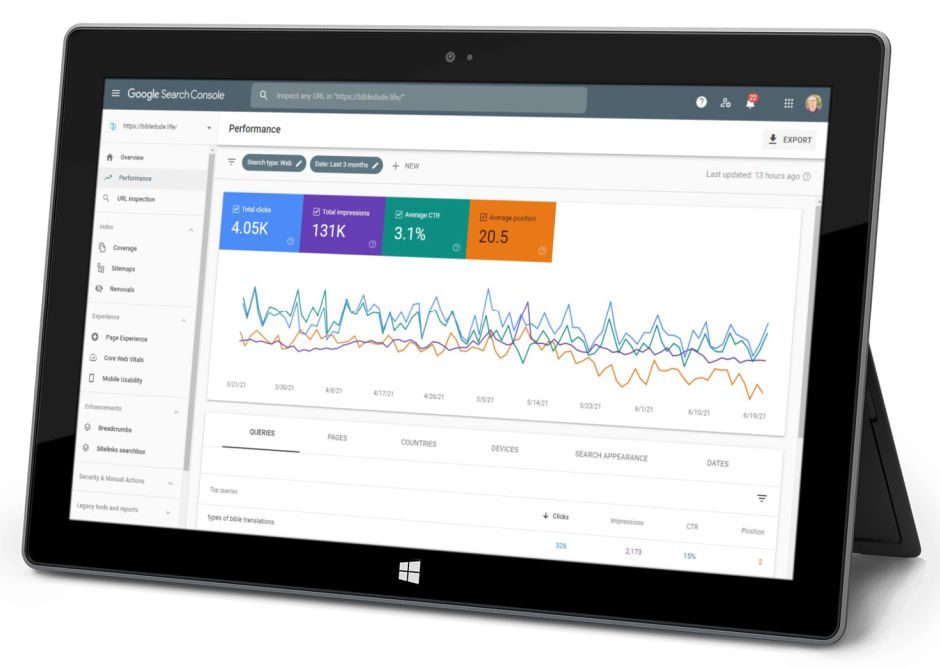
The follow-through is probably the most important element of your strategy, because it’ll show you how you can improve. And while Google Analytics will give you some great information about what your visitors are doing when they are on your site, Google Search Console will give you some incredible insight into how Google is ranking your pages/posts in their search results.
With the data in Google Search Console, you’ll be able to evaluate:
- Which terms you’re ranking for.
- Where the pages/posts on your site are ranking (on average) in the results.
- How many clicks (and the click-thru rate) you’re getting from any of those search results through to your website.
- Errors that Google sees that can impact your rankings.
All of this information can tell you how to optimize your content, including the meta title and descriptions, in order to improve rankings and click-thru visits. And knowing the errors that Google sees when their bots crawl the site gives you the opportunity to correct the issues and keep the crawls running smoothly.
Conclusion: Getting Blog SEO right
Blog SEO isn’t really rocket science. But there are some key concepts that you need to understand. And if you can build a solid plan for how you approach your blog SEO, then you’ll be rewarded with some great traffic from new readers who are looking for you right now. I can’t stress this enough… If you’re a writer, keep writing great content for people. You shouldn’t really be thinking about blog SEO while you’re writing. Think about whatever message you have for your readers. But if you have the strategy built into your publishing process, then you’ll be able to create your content in such a way that it’s more likely to climb the rankings and get found more often.
Better search engine rankings = more traffic for your website = greater readership for your writing.
P.S. We’ve developed a course to help you understand key SEO concepts and build a plan that will drive more traffic to what you’re writing. And just as a thank you for reading this post, you can get How To SEO a Blog for 25% OFF using the promo code of SEO25OFF at checkout!
.
by Dan King | Feb 2, 2021 | seo strategy
It certain is frustrating sometimes, right? Trying to figure out how to get customers to leave reviews for your business is one of those things that keeps many business owners up at night! Positive reviews are a major factor in getting better search results for a small business.
You’ve exceeded your customer’s expectations with your product or service. You’ve under-promised and over-delivered. Maybe you’ve taken a loss for them. Or you’ve worked late to get their projects done.
Above and beyond. You’ve earned a certain level of praise, for sure!
And when you talk to them, they’ll even tell you how much they love you. So why won’t they do it? Why won’t they write a review?
Barriers.
Barriers Keep Customers From Writing Reviews
Happy customers are generally open to the idea of writing a review. Unhappy customers on the other hand, are far more motivated express their frustration online and write negative reviews.
But both customers are in the minority.
The vast majority of customers simply don’t leave reviews. They don’t offer feedback. There’s a wide variety of reasons but it really comes down to four common barriers.
Aside from expectations, these barriers determine whether you’ll be able to get a customer to write a review.
So, how do you get more customers to write reviews?
It’s simple.
You eliminate the barriers.
But first, you have to identify them.
Get a Free Reviews Scan and Local Business Listing Audit!
Barrier #4: Happy customers are secretly unhappy
Most customers aren’t open with the companies they do business with. The sad part? Many happy customers are secretly unhappy.
Most customers won’t tell you they’re unhappy.
Skeptical?
Here’s a look at a few stats pulled together by Help Scout:
- For every customer who bothers to complain, 26 other customers remain silent. Source: White House Office of Consumer Affairs
- A typical business hears from 4% of its dissatisfied customers. Source: “Understanding Customers” by Ruby Newell-Legner
- Resolve a complaint in the customer’s favor and they’ll do business with you again 70% of the time. Source: Lee Resources
- 91% of unhappy customers will not be willing to do business with you again. Source: Lee Resources
Here’s the real reason customers won’t tell us the truth. We’re socialized to be “nice.” Telling the truth often comes with unpleasant consequences.
And when it doesn’t?
Delivering bad news or constructive criticism feels yucky, especially when customers feel it’s petty, tiny or insignificant. Even delivering good news can create headaches. Especially when the recipient of that news takes it pretty hard or reacts negatively.
For some customers it’s just not worth it.
Most of these customers feel it’s better to simply keep their thoughts, feedback and opinions to themselves.
So, how do you fix this?
Create an environment of safety.
On the surface that sounds easy but it can be difficult to put into practice. Here are a few strategies you can test in your business.
- Welcome horrible reviews. A negative review is a wonderful opportunity. It’s a chance for you to show prospective customers you’re a safe company to do business with. When something goes wrong customers know you’ll take good care of them. Thank customers for their unpleasant review, act on their feedback, then show what you’ve done.
- Ask customers for good, bad and ugly feedback. Reassure customers, letting them know it’s safe for them to hold you and your staff accountable. Then, keep your word. New customers will test you; they’ll attempt to verify your words. Handle it well and you’ve earned their trust (and a review). Mess things up and they’ll quietly slip away.
- Improve staff EQ. Give staff the incentives they need to eliminate dysfunctional behavior. Use training, resources and tools to eliminate the big four relationship killers – condescension, contempt, defensiveness and stonewalling. Be kind, be helpful or your chance at a review will be gone.
- Promote clarity over persuasion. Anticipate and defuse concerns, objections, risks and fears ahead of time. Create policies that ensure customers feel safe and treated well.
Barrier #3: Customers don’t remember what you did
When you’ve done a great job, customers tend to forget. Do a bad job and customers never forget.
We all have a negative bias.
As people, we’re on an obsessive hunt for problems. For disasters, fears, and frustrations. Research shows we’re far more attuned to the negative events in our lives than we are to the positive.
Our negative bias keeps us safe.
It’s an important survival mechanism we depend on from the time we’re born.
- Problems create stress and anxiety.
- Solutions (you) relieve stress and anxiety.
When you give customers the solution they so desperately need, you give them relief. That’s a good thing (obviously) but it’s also a bad thing.
Because relief induces forgetfulness.
The longer you wait to ask customers for their feedback (or a review) the less likely they are to remember what you actually did for them.
So, how do you fix this?
It’s simple. You ask customers for their feedback or a review, immediately or shortly after they’ve purchased and used your product.
Kind of obvious, right?
There’s actually a better way. You prime the pump. When you sign customers up, you tell them you’re going to do a regular check-in to make sure they’re taken care of, like this:
Hey, Angie!
We’re excited that you’ve decided to join our tribe and have you as a customer!
And we want to make sure you’re taken care of. So, I want to reach out to you for a quick 2 min chat to make sure you’re in a good place with everything.
Would that be okay?
You can use this check-in to share feedback, concerns, complaints, vent about a problem – it’s all fair game!
Just let me know when it would be convenient for you for us to connect.
Thanks,
Dan
You’ll obviously want to customize things for your business, but you catch my drift, right? Then, you schedule each “check-in” with your customers. If you can, it’s also a great idea to use an automated review management tool (like fistbump.reviews) to automate review requests. Review conversion rates go way up when the email “ask” is combined with a face to face request.
Save live chats, record phone calls (get permission), save emails.
You dramatically reduce churn and you gain valuable insights to make them happy. And the best part? Customer reviews are baked right in!
Barrier #2: It’s too hard to write or share a review
Great success! You have a customer who’s able and willing to share a positive review. They decide to search for your business on Yelp and they see this.
Customers can’t seem to find the right account or profile…
They spent 15 min writing a review only to lose it…
It’s too time consuming…
Or too whatever.
Customers write reviews for a wide variety of reasons.
Customers stop caring when it becomes tough to actually write a review – whether that’s on your site or a third party site.
You know what that means.
They lose interest and they abandon their review. And just like that the opportunity is gone.
Here’s the thing.
It’s not just about technical difficulties. It’s also about direction. Customers don’t always know where to write or share their review.
They need direction from you.
So, how do you fix this?
You make things ridiculously simple. You make it incredibly easy for them to write a review. Then you show them where you’d like their reviews to go, like this:
Hey, Angie!
Your feedback was amazing! Thanks so much for sharing.
Would you be willing to share your feedback and advice with other customers if it only took 30 seconds?
Please let me know,
Dan
It’s ridiculously easy for customers to respond. All they have to do is write a “Yes” or “No.”
Okay. They’ve said yes. What do you do?
Thanks so much, Angie!
Here’s what you can do.
- Copy and paste your review below.
- Click this link (link to your preferred review site)
- Paste your review, select a rating and click Done
…..
[Customer’s review transcript goes here]
…..
Thanks again!
Dan
Alright… What if they say “No?”
Hey, Angie,
No problem! Thanks for letting me know. I’m curious, what is it about sharing feedback that isn’t working for you?
Thanks again,
Dan
You’ll have some customers who ignore you anyway. That’s fine. Focus on the customers who answer. Thank them for their feedback, act on it (if possible), then show them that you’ve taken their advice.
What if you don’t want to do the personal follow up? What if you’re looking for a systematic way to attract customer reviews?
If you’re looking for a scalable way to attract reviews you’ll need your review funnel. Semi-automation is key if you’re looking to gain traction quickly. Using your review funnel gives you the ability to scale quickly, reminding customers to write a review and share their feedback.
Barrier #1: Customers don’t know what to say.
The biggest hidden barrier by far is awareness. Many customers simply don’t know what to say. So, rather than struggling with it they simply do nothing.
You can change that.
You can guide customers. Does this mean you’re telling customers what to say and when to say it?
Absolutely not.
It means you’re focused on asking the right questions. Why do questions matter? And, how on earth will questions get you the amazing reviews you’re looking for?
Clayton Christensen, a professor at Harvard Business School, shared the answer.
“Questions are places in your mind where answers fit. If you haven’t asked the question, the answer has nowhere to go. It hits your mind and bounces right off. You have to ask the question – you have to want to know – in order to open up the space for the answer to fit.”
Customers can’t teach you about their experience until you’re ready to learn.
Ask the right questions and you give customers the fuel they need to create amazing reviews.
Because reviews flow from feedback.
Ask customers the right question and the barrier – I don’t know what to say – fades away.
Which questions do you ask and when?
First, start with the basics.
- What would have prevented you from buying?
- What did you find as a result of buying this?
- What did you like most about our product (or service)?
- What would be three other benefits to this product (or service)?
- Would you recommend this to someone else? Why, or why not?
You can add in additional questions as needed provided that you make it easy for your customers.
Make it easy, and barriers come tumbling down.
Aren’t barriers unnecessary?
Believe it or not barriers are necessary. Sounds crazy doesn’t it? Who makes it harder for customers to write positive reviews?
You do, if you’re a savvy marketer.
Reviews are like magnets. Customers are drawn to them. That’s a problem if you have the wrong customers.
- Have discount shoppers? Offer great service and you’ll attract more of their penny pinching friends.
- Provide lots of “handholding?” You’ll attract more of the same demanding customers.
- Nightmare customer writes you a positive review? You’ll attract more customer predators looking to take advantage of your generosity.
What if removing barriers doesn’t get customers to write a review?
It won’t for everyone.
But you’re not looking for everyone. You’re looking for all-stars, customer evangelists who’ll tell everyone they know about your business.
The diamonds in the rough.
How To Get Customers To Leave Reviews
You’ve exceeded their expectations. You’ve under-promised and over-delivered. You’ve taken a loss for them. You’ve gone above and beyond.
But when it comes to writing a review for you, they’ll still continue to struggle with following through…
If these barriers remain intact that is. When you discuss things with them, they’ll be full of praise. When you ask for feedback they’ll do their best to be nice. But these barriers will keep them from writing a review.
Happy customers want to write a positive review. Remove their barriers. Make it easy for the right customers and you’ll find their reviews exceed your expectations.
Get a Free Reviews Scan and Local Business Listing Audit!