Stories have been the primary tool for connecting people and sharing ideas for thousands of years. And if you want to develop deeper connections with your customers (existing and potential), then brand storytelling is a marketing strategy you’ll want to master.
Storytelling has been a big part of my journey both as a blogger/author and a business owner. So you can imagine my excitement when #SEMrushchat, a weekly Twitter chat with some of the best minds in digital marketing, picked this as a discussion topic.
#SEMrushChat is live TODAY 📣 This time we will be discussing the power of storytelling as a marketing tool with our special guest @iSocialFanz 🔥
I’m not going to share every Tweet from that conversation, but I thought the conversation was worth sharing here. Here are the questions, my responses, and the SEMrush question recap posts that include details from other people’s responses.
Q1. Why is storytelling important for business?
A1. Stories are what connect us.
We identify with each other and our ideas when we process that through stories.
Step away from marketing strategy for a moment. Stories have been used to communicate and carry on ideas for thousands of years. Hearing a story gives you a greater opportunity to connect emotionally. It also makes the idea easier to remember and communicate. We still tell stories written decades and centuries and millennium ago. The staying power is awesome.
Now think about how powerful it would be if you could use that in your business. Brand storytelling is all about using the power of story to connect with your customers over shared ideas and values. And that can be an incredible marketing tool!
Q1 Recap. If you want to get more attention, make an emotional connection, and stand out from the crowd, using the power of storytelling is your best bet 🌟 #SEMrushChatpic.twitter.com/xOQ31SX9w3
I love the responses that get into things like how “stories humanize brands.” So much of how small businesses do digital marketing is to blast features, benefits, and technical aspects of their products. That misses the mark. If you can get into the story you need to tell, then you’re building something people can better relate to.
Q2. Once you’ve decided to create a storytelling strategy, what are the steps you should take?
A2. The first step is to clearly define the elements of the story…
🤜 The hero (put your customer here, not yourself) 🤜 The guide (you, helping the hero through their journey) 🤜 The challenge/antagonist (the problem to overcome) 🤜 The journey/path#SEMrushchathttps://t.co/6yygkydyr6
The stories we tell can be dynamic and flexible for sharing in different ways on and offline. So the first thing you need to do is clearly define certain common elements. I often take an approach of making the customer the hero of the story, not you (the brand/business). And you can have a few different stories related to different types of customers and/or problems they encounter. So being clear on what the hero in your stories looks like helps you to have a framework for telling many different stories everywhere you want to tell them.
But this idea of not telling your story, and making the customer the focus (hero) is something others don’t always easily get…
For the most part… clients aren't as interested in YOUR story as they are in how you can help them in THEIR story.
That means flipping the story so they are the focus (the hero), and you are their "Yoda".
Self-focused stories tend to be more like bragging.#SEMrushchat
This is an idea that I’ve experienced in many of my non-profit storytelling adventures. We’ve raised large amounts of money online by inviting other people to be the hero of the story. And applying the hero/guide concept to brand storytelling is something one of my favorite writers has been teaching too. Donald Miller’s Building a StoryBrand: Clarify Your Message So Customers Will Listen (affiliate link) book is a great resource that digs much deeper into this topic.
Ok, thanks. Sometimes your own story is relevant — I'm thinking to demonstrate credibility — e.g., demonstrating how by having gone through that journey yourself you now have the skill to guide them in theirs. But I see how the story is still about them. #SEMrushChat
Point taken. In Star Wars (the original trilogy), Luke Skywalker is the hero. And with brand storytelling, that’s where we want our customers to be. It’s all about their journey. Then there’s Yoda, the guide. And that’s where you want your business to be. It’s not that Yoda’s story doesn’t matter, but it’s not his journey, and he’s not the hero of that story. In fact, the more we learn about Yoda’s backstory, the more helpful it is to understand his role in Luke Skywalker’s journey. So I’m not saying ignore yourself. Just position yourself properly within the story.
One of the biggest things I see from others in this part of the conversation is the importance of planning your content. And that’s definitely a big factor with any marketing strategy. The stories we develop can be used in various ways across many platforms. Take the time to develop it well, and plan how you are going to use it in different places. Then let it guide how you share everything. Even when you’re curating content from other sources on your social media profiles, ask yourself how it supports the stories you’re telling.
Q3. What are the essential questions to begin gathering your own stories?
A3. Some of the core questions should be:
🤜 What problem/obstacle did you overcome? 🤜 What tools/people/concepts helped you overcome it? 🤜 What does/did the end result (victory) look like? 🤜 How will other people find themselves in similar situations?#SEMrushchathttps://t.co/tyNsxrRo6M
For me, the biggest questions are around the elements of the story. These elements can help you draw strong connections between the stories you have in your back pocket, and communicating what a particular customer needs to hear. It’s important to have a library of stories that you can tell. Not every one of them is going to match the journey another new customer is on. So spend the time thinking about all of the problems/obstacles you encounter, so that you can have one of those stories ready for the next person who needs to hear it.
And I love seeing responses talking about things like values. As a business owner myself, my values are part of the reason my customers like me. The core products themselves can maybe be purchased elsewhere. But not everyone has the same values I do. And that kind of thing can be a big deciding factor for potential customers.
Q4. What are the possible forms of storytelling available for any business?
A4. Stories can be used in LOTS of ways…
🤜 In-person with customers 🤜 Blogs/on-page content 🤜 Video 🤜 Podcasts 🤜 Images/graphics 🔥 Campfire conversations#SEMrushchathttps://t.co/FplX4Df7IY
Not only can the stories be told across various platforms, but how you tell them can vary too. And it should also be the filter for anything else you do, whether you’re “telling the story” or not. Think of your company’s Facebook page timeline. Look over the posts for the last couple of months like you’re reading a book. What story does it tell?
Q4 Recap. @iSocialFanz says that in today’s on-demand world we must embrace the fact that EVERYONE learns & engages differently so we must tell our story in different forms ⭐ Below are some of them ⏬ #SEMrushChatpic.twitter.com/QW5FHRHZYI
And I totally agree with the idea that everyone learns and engages differently. Too many businesses use the same exact post shared on multiple social media platforms. Take the time to evaluate and customize the messaging for each platform. It’s a little more work, but the payoff is huge.
Q5. What resources on marketing storytelling would you recommend to go deeper into that topic?
Basically, I believe it’s important to be a student of the subject in order to be an effective marketer. One practice for that is to read good stories (and watch movies with good stories). This is also where books like Invisible Ink, Rivet Your Readers With Deep Point of View, and On Writing (affiliate links) have proven to be valuable resources for making me a better marketer.
The other resources mentioned here are all fantastic. I’ve already seen several of these and can attest to how valuable they are. And the others just got added to my list of things to study on the topic.
Final Thoughts on Brand Storytelling
One important takeaway I got from this #SEMrushchat session was that brand storytelling is something that needs to be strategic and well thought out. It’s not good enough to scribble a few ideas on a napkin, make a quick YouTube video about yourself, drop on your website, and call it a day.
Spend some time thinking through what your brand stories should accomplish, craft them well, and let them take on their own life… everywhere. Putting in the effort will get results if done consistently over time.
Most of the small businesses we work with don’t have huge marketing budgets, so they need affordable local SEO services. But navigating the complex landscape of search engine optimization for small local businesses isn’t easy.
Either the strategies are too confusing, or the budget required to get results is (way) too high. Or both.
That’s usually a recipe for a hopeless business owner/manager. Many who find themselves in this spot either:
Invest in cheap (and very questionable) tactics that ultimately can get them penalized
Getting on the first page of Google too often feels like a pipe-dream. Especially for people in ultra-competitive markets.
And that’s where we were with one real estate agent (in Florida). The thought of getting on page one of search results organically seemed out of the question. As a result, the client dished a lot of money into some very expensive Google Ads.
The problem with ads is that the second you stop paying for them, they go away. So we wanted to build some natural rankings that would stay there.
The good news?
We stayed focused, with a limited budget, on some key SEO strategies that ended up driving some pretty nice results.
What’s better?
That was an ultra-competitive market with tons of hardcore competition. So if we can see these kinds of results there, then it’s absolutely possible to do it on other niches as well.
Let’s take a look at what happened…
Download Your Free White Paper Now!
IMPACT OF LOCAL SEO SERVICES THAT GET YOU ON PAGE ONE
If you can get onto page one of the search results, then that can drive a significant amount of traffic. And those are potential customers who are actively looking for what you have to offer!
Better than that, if you could get into one of the top three positions, then that’s even better! Studies have shown that approximately 62% of search engine traffic goes to websites ranked in the first three positions (33% to position one, 18% to position two, and 11% to position three).
Our studies have also shown that the quality of traffic coming from organic (non-paid ad) search results is typically higher quality (more time on site, lower bounce rates, etc) than traffic coming from the paid ads.
Basically, not all traffic is equal.
And generally speaking, higher quality traffic is more likely to convert into a lead or customer (considering your website is built to optimize for conversions).
Local SEO has some unique factors as well. It’s not just about targeting keywords. You also need to drill down to geographic locations. You can’t just add keywords like “[your niche] near me” on your web pages and expect it to flood in the traffic who are looking for you.
And that’s where most business owners stumble.
Getting the right mix of the right tactics is important. Oh, and without breaking the budget, pretty please.
WORKING IN A HIGHLY-COMPETITIVE NICHE
As we worked out the strategy with this client, generating leads was the single most important desired result. Part of the downside of a great SEO strategy is that it just doesn’t happen overnight. It takes time to build the reputation on search engines required to get and stay on page one.
Truth be told, they didn’t have time to wait for the organic rankings to come.
So they made a large monthly investment ($2,000/mo+) in Google AdWords. The results weren’t always fantastic. But they were results. Enough to justify the investment.
We just wanted better rankings and higher-quality leads.
That meant that we needed to establish a high level of local credibility online.
Being a real estate agent in Florida is a tough market too. There are literally thousands of them in the local area, and every one wants their website to rank on page one. Standing out in a market like that is certainly a high order!
Building Authority and Momentum in a Competitive Niche
The initial baseline report at the end of December showed a very low volume of total keywords, especially those on the first page. Just one term ranked on the first page, and there were only six total keywords on the first three pages. And while there were other terms ranking on pages 4-10, the overall volume was still pretty insignificant.
The September report (nine full months later) showed a very different picture. We increased the number of keywords ranking pretty significantly:
Page 1 results increased from 1 to 10 (a 900% increase)
Pages 1-3 results increased from 6 to 82 (a 1267% increase)
Pages 1-10 results increased from 81 to 505 (a 523% increase)
While the total volume of terms appearing on the first page of search results still isn’t overwhelming, this definitely shows a trend of increasing opportunities to get found. Those 72 keyword results on pages 2 and 3 are great low-hanging fruit, ripe for boosting onto the first page!
The momentum was building. And even with just a few keywords ranking on page one (for some pretty high volume search terms), we started seeing some of those leads flowing in.
The best part is that the approach consisted of some simple and affordable local SEO services.
TWO Affordable LOCAL SEO SERVICES THAT GOT US THE RESULTS
We focused on what I considered two “must-have” tactics that I believe every small business should be doing. This helped us keep the budget as low as possible, but still gave us some on-site and off-site pieces that drove the results we were going for.
Every month we would produce two strategically-developed SEO blog posts. We would do one 500-word post ($97) and one 1,000-word post ($173). These helped us develop the keyword breadth on the website itself.
After running a full citation audit, we would add/update ten online business directories (i.e., Yelp, BBB, Thumbtack, etc), ten geotagged photos, and ten social profile links every month ($197).
So for less than $500/mo we were building links and developing a core of content on the website with a focus on high-value, local search terms. We did this consistently, month after month, without fail. And consistency is one of the keys to building momentum with search engine results.
Element #1: Blogging for Local SEO Results
Blogging is one of the best ways to create some keyword authority on your website, but few know how to do it effectively. A few key elements to making this work well are:
Start with keyword research. It’s important to look for current trends in the user’s search behavior. And you’ll want to focus on terms that provide a good combination of higher search volume and lower competitive density.
Build on competitive content research. Once you have your target keyword, then you’ll want to evaluate other similar content out there to see what’s getting others ranking for similar terms.
Write for the users, not for search engines. Crafting good, useful content is what search engines want. Think about building a great resource that helps people, and it’ll pay off with the search engines too.
In this example (above), we targeted “selling waterfront property” to attract the kinds of potential sellers the agent wanted to get listings from.
As you build a library of useful content like this on your website, you’ll be creating more entry points for visitors to come through.
Element #2: Local Citation Link-Building
Links are what drives the Internet. And a good link-portfolio for any website will feature a variety of types of links from several different places.
Generally, things like guest-post links and contextual links can help you build a strong base of keyword-focused links. And that’s a great thing! But when the budget is limited, then you’ll need to focus on the stuff that drives the biggest geographic impact possible.
That’s where local citation link building comes in. With this strategy, there are three things we focus on to build the local push we want:
Local and business directories. The biggest of these you’ve likely heard of is Yelp. And there are thousands of others that exist and can have listings for your business. The trick here isn’t thinking about the traffic that they may (or may not) drive. But the location-based links back to your website from (generally) high-authority websites is a big deal.
Geo-tagged photo posting. Adding images with geo-location factors on image websites is another tactic that creates location-based links, signaling areas you want to show up in for searches.
Social profile posts. This is a little bit different than just your standard Facebook or Twitter posting. But there are similar sites where profiles and links can be created to provide an additional layer of references.
The result is a regularly growing and diverse set of links with a geo-focus. It’s not as strong with the keyword factors, but it’s great for the location factors.
Do this, along with a strong Google My Business profile, and you’ll be setting up all of the right signals for search engines to know where you’re at.
Download Your Free White Paper Now!
Implementing Affordable Local SEO Services
Your local business doesn’t need to suffer in obscurity! Getting found in a local search isn’t that difficult if you’re doing the right things. But consistency is the key. Results won’t happen overnight with just one or two months of trying these strategies.
And depending on how competitive your niche is, you might be able to get away with a smaller budget (for less competitive niches than Florida real estate agents). You could also see better results faster. Regardless, the bottom line is that we’ve seen this strategy work over and over with lots of clients.
The key is to stick with it, follow the data, and keep building based on what the data is telling you.
With a strategy like this, you’ll build strong rankings that will drive substantial traffic to your website. And that traffic is likely to be more highly qualified and motivated to connect with you.
If you have any questions about how a plan like this might work for you, or just need a little coaching along the way to make sure you’re doing it right, then grab some time for a quick chat. We’re always happy to help!
If so, you’re taking a major step in the right direction. The digital marketing software sphere alone will skyrocket to $105.28 billion by 2028, signaling that more business leaders than ever before plan to invest in the tools and technologies required to put their company top of mind.
Today, we’re taking a look at the importance of digital marketing from a competitive and performance standpoint to grow your business. Why does it matter and what does it mean for the future of your enterprise?
Let’s get started!
Boosting Your Online Visibility
In the past, the only way to drive traffic to your store was to create physical signage. You’d spend the money, do the work, and hope that passersby would notice and direct their foot traffic your way.
Now, both e-commerce retailers and brick-and-mortar retailers alike are turning to the internet to deliver outreach messages right to the customers they need.
According to the U.S. Department of Commerce, online sales outpaced general merchandise stores for the first time this year. What’s driving this shift in market share?
Today’s buyers are hopping online to buy everything from their weekly groceries to their Friday night movie rental. In fact, even if they’re determined to buy an item in-store, 82% will still conduct online research, first!
Simply put, having an active internet presence is necessary to survive in today’s competitive business market. If you bring all of your core functions, including your marketing campaigns, into the digital sphere, the number of eyes you can get on your content jumps from your local patrons to a global online community.
Create Customer Connections
Did you know that 70% of shoppers who feel a connection to your brand will spend twice as much on your business? One of the major digital marketing benefits is that it allows you to create personal connections with your online followers.
This is especially true if your digital marketing efforts stretch across the major social media platforms, including Facebook, Twitter, Instagram, and LinkedIn. Here, you can share blog posts, advertise upcoming promotions and product releases, and spark conversations with your target audience.
Another benefit of staying active on these channels?
They give you a direct link to the opinions and preferences of the buyers your business wants. When you connect in this way, you establish an organic and natural connection that feels more authentic than gimmicky sales tactics.
As only 52% of consumers around the globe trust businesses, these genuine networking opportunities are gold.
Establish Thought Leadership
Want to boost your brand credibility, grow your online following and improve your bottom line? In today’s competitive marketplace, this kind of growth requires thought leadership.
You might be the best in your industry niche, with state-of-the-art products, services, and ideas. However, unless you’re sharing this knowledge with the people who need to hear it, your efforts could fall flat.
This is where digital marketing comes in.
The top way to establish your company as a thought leader in its space is to create digital content that meets the following criteria:
Relevant
Helpful
Interesting
Timely
Shareable
Actionable
Regardless of your sector, you have something valuable and new to bring to the conversation, so it’s time to say it!
Create a blog, record a podcast, write an e-book or develop an entire online course around the knowledge that you want to share. Some material, such as blogs, can be free while you might charge customers a fee to download longer-form content.
Appeal to Mobile Users
An effective digital marketing strategy incorporates website optimization tactics to ensure that all content looks as great on a smartphone as it does on a laptop. When you take into account load time, typography, image size, touchability and more, you can help deliver a seamless user experience across any device.
Research shows that 72% of people will access the internet using only their smartphone by 2025. If your marketing collateral is responsive, quick to load, and visually dynamic across any screen, you’ll capture their attention, even when they’re on-the-go.
Create a Brand Presence
Digital marketing allows you to carve out your own corner of the internet. For your brand, this means that you can create cohesive touchpoints all around the web that tie your story together. At the same time, you also offer your customers the opportunity to add their own pages to the tale.
From your social media accounts and blog posts to your virtual checkouts and web pages, every online element can tie back to your brand, showcasing your logo, font, verbiage, and more.
In this way, you can create a memorable, unified brand image that’s critical for customer recall. Then, when someone uses your service or buys your product, they can hop online and tell others about it.
From the glowing reviews to the negative ones, all kinds of client feedback can help fuel your business forward. Studies show that 84% of people actually trust online reviews as much as recommendations from friends and family members, so it’s important to give your audience a voice. This is free advertising you couldn’t get without the power of digital marketing.
Leverage SEO to Improve Rank
Search Engine Optimization (SEO) is a major facet of digital marketing. In short, this is the collection of tools and best practices that help your website rank as high as possible on Search Engine Results Pages (SERPs).
In years past, adding a couple of keywords to your site was the extent of a successful SEO strategy. Now, however, SEO requirements are more complex than ever before, and forward-thinking companies require sophisticated tools and technologies to keep them on track.
While valuable content and keywords are still relevant, a modern SEO strategy takes into account other factors, including:
Your audience and industry
User intent
Reporting and analytics
Crawling
Mobile SEO
Technical SEO
Indexing
Linking
Knowledge of SEO can make a major difference in the success of your digital marketing efforts. This is why it pays to partner with an SEO expert who can show you where your website currently stands and help you get it where it needs to be.
Expand Through E-mail Marketing
In a world of flashier and more tech-savvy measures, e-mail marketing still holds incredible power. However, sticking with the old method of blasting your latest blog post to your list of subscribers won’t cut it anymore.
Advanced digital marketing platforms allow you to customize this outreach approach to improve conversion rates and draw more traffic to your site. Some strategies you can implement include:
Personalizing your messages
Segmenting your subscribers
Sending mobile-friendly emails
Automating campaigns
Testing copy, buttons, and designs
Email subscriber management tools and services can help you transition from your current email marketing system onto a more effective and modern platform, such as MailChimp, without interrupting your subscribers.
Analyze Your Campaign Efforts
Do you want to measure how successful your last marketing campaign was? Do you need metrics to track and patterns to analyze so you can make sure your next one is the most effective yet? Paper-based modeling methods are antiquated and limited in scope, which can hinder and stall decision-making efforts.
Digital marketing software, on the other hand, allows you a valuable and in-depth look at key performance metrics.
Regardless of whether you’re running an email marketing campaign, analyzing website visits, measuring site traffic or tracking customer service response times, you need insight into the numbers that matter. And, it’s smart to have these numbers as soon as possible. This way, you can take action before your cart abandonment rates skyrocket or your SERP position dips.
Leverage the Power and Importance of Digital Marketing To Grow Your Business
You’ve put the hours into growing your business, developing your projects and fine-tuning your management approach. Now, it’s time to make sure everyone else knows your name.
Traditional marketing strategies that worked years ago could render your company irrelevant or even obsolete today. That’s why you can’t overlook or overemphasize the importance of digital marketing to grow your business. From email marketing lists to SEO strategies and social media campaigns, there is no limit to the steps you can implement.
Want a little help as you unroll your new outreach plan? That’s where we come in.
We’re experts in this space, with years of experience helping clients make the most of their media strategies. From website development and email subscriber management to social media analysis and publishing services, we do it all.
Contact us today to learn more about how we can help your business grow. In the meantime, check out our free e-book on marketing strategies for business success!
A woman approached me as I was preparing for my lessons for the day. I was in Kairi, a rural village in Kenya, teaching some basic business skills classes to members of a microfinance group.
She introduced herself as Alice.
In our class the day before, I taught a lesson on managing money in a small business. I used a fictional business owner named Alice to illustrate the importance of keeping business money and personal money separate.
Alice was her real name, and she told me that today she is a “new Alice” after my lesson. She continued, “No more will I be the old Alice who is not wise with her money!”
And that’s why I’ve made it an initiative of ours to support microfinance projects this year. Our goal is to help provide opportunities for small business owners, especially in underserved areas.
We’re working through Kiva, a top-rated charity who bridges the gap between people and entrepreneurs around the world. Kiva’s mission is “to connect people through lending to alleviate poverty.”
After six months of working on this project, this is our first Kiva Impact Report.
Empowering Entrepreneurs Globally
The best thing about microfinance is that it isn’t about donating free money to people. These are small loans designed to enable an entrepreneur to grow their business. This allows small business owners to not only provide for their families, but many of them also create jobs in their communities.
In our efforts this year, we’ve supported microloans for people like:
Osterman in Columbia (pictured above) – As a farmer, he used the loan to hire local laborers to help him build drainage canals for better irrigation for his crops. His loan is currently 13% repaid.
Shoyra in Tajikistan (below, left) – Her loan was used to buy a sewing machine and start a new business sewing women’s clothing. Her loan is currently 21% repaid.
Wilmer in Ecuador (below, right) – He owns a taxi, and his loan helped him do maintenance and change the tires on his taxi. He also got additional business training to go with the loan. His loan is already 73% repaid.
Each of these entrepreneurs has dreams, not unlike my own, to grow a business so they can better support their families. Many are working to improve their homes and pay for education for their children (something often taken for granted in a country where we have free public education).
Every one of these microloans gets them one step closer to fulfilling their goals and dreams.
Using Kiva as a Tool To Support Microfinance
The best way I can describe what Kiva does is that it’s kind of like a Kickstarter for microloans to entrepreneurs in poverty-stricken areas around the world. (Kiva is actually older, but I know the reference would make sense.)
Their website allows you to search for borrowers by region, business sector, and/or other attributes you may want to target.
Each borrower has a profile page telling you about the loan, the story of the borrower, why the loan is special, and several other details. A loan can be for any amount, and lenders can chip in for as little as $25.
The idea is that many of us can throw in what we can to fund that entrepreneur. Together we fund the loan, and repayments are distributed back to each of us when the borrower makes their payments each month.
When that money is repaid, we can then turn it around and lend it to another entrepreneur. That means $100 initial investment can end up having a far greater impact over time as it continues to get reinvested.
Business Supporting Business
At the beginning of 2019, we started allocating $100 from each new qualified small business client who started working with us towards a microloan. So for each business client starting a new website development project or using us for our ongoing SEO services, we would make the contribution toward a business through Kiva.
As a growing business, our heart is to leverage some of our profits to support other growing businesses around the world.
Once we’ve selected an entrepreneur to fund through Kiva, we also notify the new client about what we’ve done in honor of them. Some have also joined our team on Kiva to further support a borrower (the same one, or another one they find on their own).
Focus on Poverty-Stricken Areas
While there is need everywhere, our focus so far has been on places where the communities are under-served, families are often displaced, and where poverty means that there simply isn’t an opportunity to provide the basics.
So far this year, out of 12 loans funded by Team Fistbump, all 12 are in different countries across South/Central America, Africa, and Asia.
While we may fund additional loans in countries we’ve already supported, our goal is to spread the love as much as we can around the world.
The Importance of Social Responsibility (and Gratitude)
There are two main reasons this is an important initiative for us this year, social responsibility and gratitude.
First, we’re driven by a desire to care for our fellow human being. This desire is rooted in our faith in God, and the Bible’s call for us to help those who have a need. As I’ve been out on missions trips around the world, I see lots of need.
So we’re using what we have to help others… not with a handout, but a hand-up.
Second, it’s about gratitude. As the founder of Fistbump Media, I’ve directly experienced what running a small business can do to provide for my family. I have a great deal of respect for others around the world who are chasing their dreams with a desire to provide well for their families.
And we’re grateful to all of the clients who have been there for us. So this is one way we can say thank you and pay forward what we’ve been given.
Our Kiva Impact Report for the First Half of 2019
In the first six months of 2019, we’ve added 8 new small business clients who have met the qualifying threshold. So that’s $800 that we’ve invested into loans so far.
With a few other small loans from team members and clients, plus a little repayment money reinvested in new loans, our total impact is $1,000 worth of microloans.
We expect the impact to grow more rapidly through the rest of the year as we continue to reinvest repayments and bring on more new small business clients. Additionally, we’d love to invite you to join the team and help us help even more people…
Final Thoughts (and an Invitation)
The impact so far has been exciting to watch! I look forward to every opportunity I get to send over another $100, or reinvest repayments from existing loans. It reminds me of conversations I’ve had with business owners on some of my missions trips when they share what kind of impact the loans have for them. It’s life-changing.
And while we’ll continue to invest as the opportunities arise, you can join us in this work too! It’s super easy…
Getting the SEO rockin’ for your small business website can be tricky (and frustrating). Especially, if you’re trying to do it on your own. The good news is that there are a number of common issues you can easily resolve, with a little direction. Focus on these strategies, and your website will be taking a giant leap in the right direction.
I’ve completed hundreds of small business website SEO audits over the past couple of months. I’ve tracked the data from these audits and ran some statistical analysis on it. There are definitely some noticeable trends.
The first thing I noticed is something many owners/managers may not realize about their small business website…
Lots of people can put together a nice looking website these days. But from what I saw, many of the most amazing looking websites were some of the worst performing ones. A primary purpose for any small business website is to drive sales. So all the pretty in the world doesn’t mean a thing.
Aside from that, there are eight key observations I’ve been able to make from looking at the data. Each of these has a significant impact on your website’s ability to do its job well.
This first observation simply blows me away. After all, this is the foundation of all other strategies for your website. It’s about domain name selection. One thing you need to understand is that the first thing people and search engines see is your domain name. And first impressions matter, to both people and search engines.
No pressure. But don’t mess this up.
Here’s what I’m talking about. Let’s say your company, Southern State Roofing Company, launches a new website. The worst thing you can do is to abbreviate the main identifying keywords into something like ssrcompany.com. That doesn’t tell anyone anything about who you are and what you do.
You’ll miss out on any kind of name recognition with people. You’ll also miss the opportunity to get the business keyword of “roofing” in there.
A domain name like southernstateroofing.com, while longer, will be easier to remember and will help your chances on search engines.
Better yet, try using one of the many not-com names that are gaining popularity. If the .com isn’t available, then a great option in this example could be southernstateroofing.contractors (yep, .contractors is an option). This can help a great deal when people search for terms like. “[your city] roofing contractors.”
TIP #1: It’s important to use a name that’s not only memorable but also one that sets you up well with the search engines.
If you don’t know already, security is a huge deal on the Internet these days. It’s such a big deal that Google is impacting search engine rankings based on how seriously you take this. And Chrome, the leading web browser, is starting to show “Not Secure” warnings for websites that don’t run an SSL (encryption) certificate.
Of the websites I reviewed, fewer than 30% of them currently do not have a security certificate.
Using an SSL certificate on your website means that it will run as an HTTPS website instead of the regular HTTP version. It will encrypt user information when delivered over the web. For example, when someone fills out a contact form on your website, their information could be exposed on a non-HTTPS website.
Taking care of security and encryption on your website with an SSL certificate will have two main benefits:
It’ll protect you from the security-mageddon happening now with search engines and web browsers.
Your visitors (potential customers) will have more confidence in doing business with you when they see the big green “Secure” indicator in their browser.
TIP #2: Get an SSL certificate for your website now. Standard Domain Validation (DV) certificates are inexpensive and are sometimes included in hosting plans.
Build a Portfolio of Quality Links Back to Your Website
There’s no doubt about it, the Internet is built on links. That’s why it’s called the web. That’s all Google is doing. At their core, they’re providing you with some links that should answer your questions. Google’s mission statement is to, “Organize the world’s information and make it universally accessible and useful.”
Google not only provides links to answer your questions, but they also evaluate links to your site to determine usefulness.
Their goal is to always provide the best answers they can to your questions. If they start providing non-relevant information, then they know we’ll leave to find answers elsewhere. So the quality of the links they provide is of utmost importance.
One of the ways they evaluate the value and authority of your content is to look at the links to your website. The idea is that if a higher authority website links to you for an answer on something, then you must be valuable.
That’s where MozRank comes in as a measurement (for us, not necessarily for Google). It’s a way to measure link popularity of a website. A website is scored on a scale from 0-10, with 10 being the highest.
The average MozRank of the website evaluated in this study was 3.79. That’s not a horrible number but still shows that most sites have a great deal of room for improvement as it relates to link building.
The average website you’ll visit when surfing the web will likely be around 3-4.
TIP #3: Make sure you have a strategy for building strong links back to your website. This can be done with SEO link-building services (like ours), guest posting on other websites, and developing local citations for your business.
Establish Your Authority
Like MozRank, the Domain Authority (DA) score has to do with how authoritative your website it. But it takes into consideration more than just the MozRank factors. It’s a score that measures a site’s authority through measuring links (internal and external), mobile-friendliness, on-page content, and site structure.
In my experience, I’ve seen DA scores go up and down just based on the page structure of a website. Specifically, as it relates to the topic(s) your website is supposed to be about.
Using the Southern States Roofing Company example from earlier, that domain name is one of the factors considered in the DA score. Choose your name wisely, and it’ll help you out quite a bit.
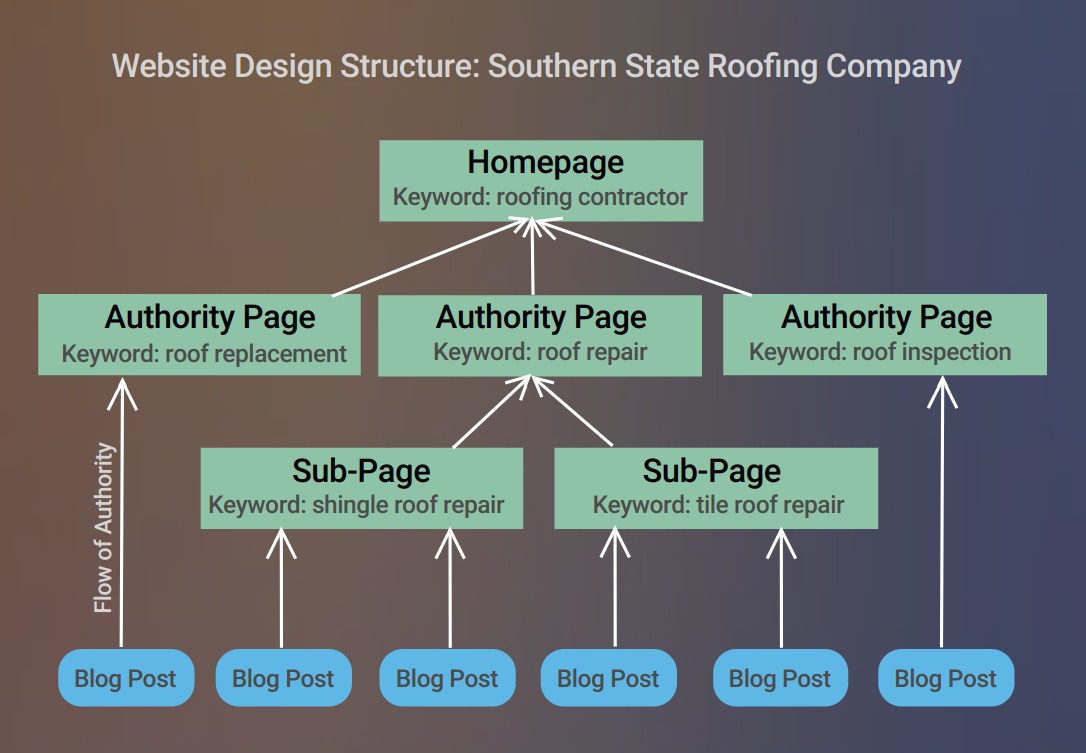
In addition to that, it should be clear to search engines (and visitors) what your website is about. If your main pages and menu structure include more generic About, What We Do, Testimonials, Gallery, Contact pages, then you’re making it more difficult for search engines to figure out what you’re really about. None of your keywords are showing there.
Instead, consider main navigation pages like About, Roof Replacement, Roof Repair, Roof Inspections, etc. This will make it more clear what you are an authority on.
And for a bonus, create subpages to build more depth and structure. So under Roof Replacement, consider adding subpages for Tile Roof Replacement, Shingle Roof Replacement, Metal Roof Replacement, etc. Additionally, blog posts can be another way to add depth to the website and pass authority up to other cornerstone content pages.
The average DA score for the websites we evaluated was 15.25. That’s on a scale of 1-100. Getting your DA score more into the 30-40 range can result in great improvements in rankings. Get yourself over 50, and you’ll almost be able to write your own ticket on the search engines.
TIP #4: Consider how well your website is built from an authority perspective (check out this case study on website structure). And develop some depth with strong content to establish your authority.
Work on Page Speed for a Better User Experience
One really important ranking factor that seems to be often missed is PageSpeed. From Google’s perspective, if you’re too slow, then you’re not a good answer for them to present. They want to minimize the impatient-factor in the results they present.
Too often, website owners and developers go for the super flashy and pretty design, but don’t do it in a way that keeps the site running smooth. Too many large images and videos and scripts can knock you way down on this score.
The average PageSpeed score of the websites I evaluated was 60, well below the 85 (on a scale of 1-100) that Google gives a green light to. And the greatest offenders were the people who likely thought they have an amazing new website that looks incredible but had scores in the 30s.
In WordPress, there are plenty of great tools to help you optimize images, minify scripts, and leverage caching. All of these are crucial in maintaining quicker page load speeds.
TIP #5: If you’re on WordPress, then consider some optimization plugins to clean things up right away. If you’re on other site builders like Wix or Weebly, consider moving to WordPress. Our managed WordPress hosting will include plenty of these tools, and we’ll even help take care of it for you.
Optimize for Mobile First
Whats worse than scoring a 60 for Google PageSpeed on your website? How about scoring a 51 for PageSpeed on mobile for your website? Unfortunately, that’s the average mobile PageSpeed score for the evaluated websites.
During a time when Google is focusing so much on mobile-first indexing, you need your website to perform well on mobile.
There are two ways you can do this:
Get your web pages running on AMP. This is Google’s Accelerated Mobile Pages (AMP) project. Basically, the idea is to push your page content into a more mobile format that Google serves up really quickly through their results pages on mobile devices. The downside is that it technically doesn’t get the traffic ON your website, so you may lose some of the experience as pages are stripped down for speed.
Focus more on the mobile version of your website’s design. All websites these days should be mobile responsive. But mobile responsive doesn’t necessarily mean that it’s mobile optimized.
With the typical website getting around 50% (and constantly increasing) of their traffic through mobile now, you cannot afford to skimp on this.
TIP #6: There are advantages and disadvantages to each of the methods of mobile optimization. The important thing is that you spend some time doing this optimization. Do take a desktop-only approach to design. And don’t just think about converting the design to mobile optimized, consider mobile-first content too.
Clean Up the On-Page Elements
One of the biggest on-page factors for your content is the metadata, image alt tags, and header text. Your keywords should be built into each of these elements on every page. Too many websites fail to optimize this for their keywords, or simply miss it altogether. In our experience, cleaning this stuff up across the website is one of the easiest ways to get some big wins with your SEO.
And don’t optimize every page on your site to the same keywords. That feels unnatural because not every page is about the same exact thing. Using our roofing company example, consider optimizing pages like this:
Homepage –> “roofing contractor” as the keyword focus
Using a plugin like Yoast SEO, the metadata can be updated in the “snippet” settings for the page. That’s the information that shows up in the search engine results for your page. (Can you guess what keyword terms the page shown below is optimized for?)
Many websites also contain generic text in header text on most website pages. For example, the header text for a section on the page might be “Our Services,” which doesn’t contain keywords. Instead, consider using something like “Roofing Services” instead.
TIP #7: Review the metadata settings for each page on your website, and make sure they contain your keywords and look enticing for searchers to click on. Also review all header formatted text to make sure it’s specific, and check all images to ensure the “alternative text” contains your keywords.
Step Up Your Professional Brand Image
This last item isn’t necessarily a performance or SEO metric. It’s more of a branding issue. Many (a large many) of the websites analyzed used a non-domain based email address for their contact email.
For example, our southernstateroofing.contractors should be using joe@southernstateroofing.contractors for email instead of southernstateroofing@hotmail.com (or worse, ssrcompany@hotmail.com).
Honestly, Gmail is not as bad because of how widely used it is. But using a domain name based email address that matches your company’s website address provides a much more professional image. And people will judge you based on little things like this.
TIP #8: Just get the email addresses set up. If you prefer, you can set up your Gmail to send/receive that email for you. So you can continue to use the Gmail interface, but with a much more professional image.
Conclusion
If you want your online marketing efforts to be successful, then getting your small business website design done properly is of great importance. And it involves more than throwing up some cool photos or some drone video. You’ll need to get these website design fundamentals done right if you’re going to have a chance of succeeding.
But if you get these elements right, you’ll set yourself up far ahead of the competition. If you already have a small business website in place, then let us run a free, no-obligation website SEO analysis report for you. You can use the information to improve your website on your own. Or hit us up to talk about how we can help take care of issues or just build you a well-designed website.
Regardless, it’s important to know where your website stands and to take steps to improve its ability to drive results for you.