by Dan King | Nov 13, 2017 | blogging strategy
With a greater reliance on using technology to manage our personal information, there is a greater emphasis on cybersecurity for protecting that information. It seems like reports of large-scale breaches come out every few news cycles. Some of the big ones, just this year, include the likes of Verizon, Equifax, Yahoo!, and the U.S. Securities and Exchange Commission (SEC). Even Chipotle fell victim to a hack.
It’s enough to make even the most confident people feel vulnerable.
And if you have an online presence you’re trying to develop through your website, email, and/or social media, then you need to be extra careful. No matter how big or how small, your digital presence could easily become a target.
Search engines and web browsers are even getting more into the security game. Site security and encryption is now a ranking factor for search engines. And browsers are starting to kick out “Not Secure” warnings on websites without an SSL certificate.
Why Being Proactive About Cybersecurity is Important
One of the bigger security concerns has to do with protecting your website from malware and phishing. Poor website security leads to cracks for malicious users who get in and leave things like viruses and other malicious tools. Sometimes these activities can even lead to using your site (even unbeknownst to you) for phishing activity to capture sensitive information. A hack on your website can damage your reputation with your visitors, search engines, and other web services.
Another major area of concern has to do with protecting your email from hacks. A hacked email account can expose more of your personal information contained in various emails. It can also result in someone using your account to send out malicious spam emails. Those emails are often used for phishing purposes or delivering viruses to unsuspecting recipients. A compromised email account could be dangerous for you and for many others.
A third, and potentially greater, area of concern has to do with protecting your other personal information and accounts. Chances are, the password you use for your website and email accounts are the same or very similar to the passwords you use for other online accounts. If a hacker can figure out your email password, and see that you do your online banking at a certain bank, then they may have everything they need to log into your bank account. Basically, getting into one of your accounts may provide easy access to everything else you do. And that could be bad news for you.
What We Do For You To Maintain Website Security
Maintenance is everything. One of the reasons our BASIC (and higher) Hosting plans are so popular is because the maintenance we do keeps websites running smooth and secure. We run WordPress, theme, and plugin updates on each site several times throughout the week. And we perform database cleanup and optimization. Many of the updates include regular bug fixes and security patches.
Server-level security monitoring. Our data center team monitors potential issues 24/7/365. Aside from maintaining server uptime, we constantly monitor any malicious activity. If/when something is spotted, we take corrective action almost immediately. This level of monitoring minimizes the impact in the event a user account gets compromised.
Site-level security monitoring. Also as part of our BASIC (and higher) Hosting, we monitor potential in-site security issues. Using tools like Wordfence Security, we regularly scan for any malicious and unusual files on the website. We take immediate corrective action and remove any potential threat we find.
Security-Related Services You Should Consider
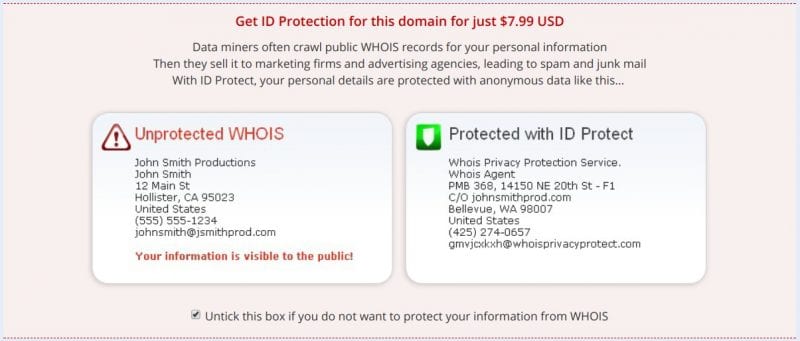
Domain name privacy. Most people don’t realize that your ownership information on your domain name registration is public. That means anyone can look up a website owner’s name, address, and phone number. That is unless you have Domain Privacy on your domain name. It’s well worth the $7.99/yr cost to hide your personal registration information. This not only limits the volume of spam coming your way, but it also limits the amount of information people can find on you.
SSL certificates. Security certificates encrypt information when passed between visitors and your website. Without this kind of encryption, even simple contact form information can be intercepted and read by people with malicious intent. Visitors can have confidence that their personal information is safe on a website when they see the HTTPS (the “s” for secure) and the green padlock in their browser address bar. A basic SSL Certificate can be purchased for as little as $27/yr, and is even included in some hosting plans.
Your Responsibility for Protecting Your Website
Change your password regularly. The more often you can change your passwords, the better. Ideally, you should change them (at least) every 60-90 days. If a password does get compromised, then it won’t be effective for very long. But if you use the same passwords for everything for years, then it opens you up to other attacks. Getting comfortable with a password is one of the worst things you can do.
Use strong password formats. The best format for a strong password is a random string of unrelated letters, numbers, and characters. But that doesn’t usually help your ability to remember your password. Alternatively, you can try using a combination of two unrelated words, a number, and throw in a special character or two. Your goal is to provide as much of an unknown scramble as possible.
Use different passwords for your various accounts. Do you use the same password for everything? If so, then one compromised password means that you’ve opened the door to all of your accounts. At minimum use different passwords for the accounts you most need to protect (like your banking, etc).
Final Thoughts…
Website security is bigger than just keeping hackers out of your website. You need a cybersecurity plan to protect your website, email, and all of your other online accounts. Taking a few simple steps and having the right tools in place can protect you and your website visitors from all kinds of malicious activity. And you will be able to sleep well at night not worrying about all of the latest cybersecurity craziness in the news.
by Dan King | Jun 15, 2017 | blogging strategy
Anyone can start a blog, but most don’t make money from blogging. In fact, many people don’t realize it’s possible to make money with a blog.
Before you can think about making money, you need to focus on writing useful content. Until you do this, you cannot move forward and bring in even a little extra income. It’s your content that keeps people coming back.
Your blog must also have followers, as they are the ones who will help bring money in. You can start with only a handful of followers. But monetizing a blog is a numbers game. The more followers you can gather, the more likely you are to increase your earnings.
Suggested Resource: Learn how to build a strategy that reaches the audience you want in 31 Days to #BlogAwesomeness.
Once you’ve done these things it’s time to begin monetizing your blog. Here are five ways you can start creating income with your blog right now.
Advertising On Your Blog
In the past, companies would advertise where their target audience spends their time. Often, that would be in magazines, newspapers, or on TV. Today, it’s much easier to reach a target audience by advertising on websites where they spend time. Through better targeting, companies generate more leads and boost conversion rates. Thus advertisers are willing to pay the site owner to help share their message.
Suggested Resources:
Hosting Events
You can host an event (online or in-person) and charge attendees for participation. This trend isn’t very common among bloggers yet. But it is gaining popularity as writers see how much income they can generate by putting together events for their readers. For example, a blog dedicated to scrapbooking can organize a scrap-a-thon or a class.
Suggested Resources:
Develop and Sell Products
Bloggers often have a marketable skill set they can share with others. After all, that’s why you write and share with the world, right? You already offer basic information about these skills through your blog. Once you’ve established yourself as an expert, you can develop and sell products on more advanced topics. Also, you can create new (exclusive) material to sell. A blog written by someone who loves to crochet could teach the basic crochet skills at no charge. As followers become more proficient, they can buy advanced classes or unique patterns.
Digital materials fall under this category and remain in high demand. You can sell an e-course, an ebook, or another kind of digital download. Podcasts are another option to consider. Many are free, but you can also create premium content to sell. Think outside the box and offer something others in the industry aren’t. Bloggers who do so will find their following expands and they generate more income as a result.
Suggested Resources:
Affiliate Marketing
A large majority of bloggers turn to affiliate programs to generate income. This involves linking to a product that is being sold on another site. When a visitor clicks on this link and purchases the product, you earn a commission. The site providing the commission supplies you with a unique affiliate code to track sales. Some sites offer a commission if the person clicking the link purchases anything on their site, as opposed to only the advertised item.
Suggested Resources:
Outside Engagements
With an established blog following, you might find that your opportunities will expand. If you position yourself appropriately, you may be offered public speaking gigs. Or you might receive a request to consult on a project. Teaching opportunities also have arisen for some bloggers. These are only a few examples of how you can generate income through outside engagements.
Suggested Resources:
Blogging is fun for many individuals as they share their thoughts and feelings with friends. Others blog to share the special knowledge they have with others and have a great opportunity to make some money. For those who fall into the second category, there are many ways to achieve this goal. With the right combination of methods, anyone can make money and turn their hobby into a full-time job.
Start with one method, become confident and add a second. If something doesn’t work, drop it and move on to the next. There is no one combination that works for all. Making money with a blog won’t happen overnight. Stick with it and you’ll find your hard work will pay off in the end. The solid foundation you created before you attempt to make money with a blog helps to ensure your success.
by Dan King | Feb 16, 2017 | local seo strategy
I’m asked about this quite frequently. It’s this question about how to design a website and ensure it’s set up for the best possible search engine ranking. Because being found on search engines can make or break your online success. So it’s not just a question about ranking high for a certain keyword. It’s about ranking high for the best keywords to drive results.
Before we dig into the details, it’s important to understand that search engine optimization (SEO) success is dependent on two factors. The first factor is on-site design and setup. This has to do with the structure and mapping of pages on your site, the content you offer, and several behind-the-scenes settings. The second factor is off-site promotion. This has more to do with link building and gaining outside credibility for your website. Our focus here today will be with the first of these two factors, on-site design.
The Background
A few years ago, some friends started a new laser engraving business. As they were kicking things off, they knew that the website was going to be a key piece of their strategy. So we got together and built a site around their main keyword of laser engraving. The site did well in ranking for that phrase, and it helped generate several new customers for them.
Over time, the business continued to grow, and the owners gained a better understanding of their niche. Most of the work they are doing falls into two main categories. One type of customer they get is business and corporate accounts looking to get logos engraved onto other products as promotional giveaways. The other type of customer is looking for personalization on keepsake items, such as wedding party gifts.
As they began to expand and focus on those two categories, they also felt like it was time for the website to evolve with them. The good news is that the website was rock solid with terms related to laser engraving. However, it wasn’t anywhere on the radar for terms related to these two categories. The new design would need to capitalize on these niche categories.
Keyword Research (Where a Good SEO Strategy Begins)
When we set out to design a website for search engine ranking, the first thing we need to do is keyword research. I’m a firm believer in following what the data tells me. I never arbitrarily pick a keyword phrase out of a hat and build a website.
We targeted three keyword phrases in order to show up in searches for the best possible audience.
- laser engraving (already ranking well locally for this, and didn’t want to lose it)
- promotional products
- personalized gifts
We selected these phrases after evaluating dozens of options and alternatives in Google’s Keyword Planner tool. When doing this for a local business, it’s helpful to filter results geographically. For example, you don’t want to use soda in an area where it’s more commonly called pop. Filtering geographically will get you the terms people actually use in your area to find what you’re offering. Beyond that, it’s all about finding the terms that have the highest search volume. And it’s a bonus if they have low competition. These terms present the greatest opportunities to capture visitors.
How To Design a Website for Results
Search engines are looking for authority. They want to ensure that the pages they send searchers to are the most helpful resources available. Old SEO methods of keyword stuffing pages just don’t do the trick anymore. So you need to show value. One of the best ways to show value (and authority) is through strong content. And long-form content typically shows higher authority than a few short blurbs. Therefore we built three high-authority pages mapped out like this:
- Homepage (main keyword: laser engraving) – Our target for the homepage is 1500 words of content. Within that content, we have sections with short summaries for the other target keyword phrases. And then we added other general information about laser engraving.
- Authority page (keyword: promotional products) – The target for other authority pages is at least 800 words of content. We used similar keywords, such as promotional items and custom logo engraving, but the main focus was on primary term.
- Authority page (keyword: personalized gifts) – This page has the same 800-word target and used other supporting key phrases like anniversary gifts and personalized wedding gifts.
The new website structure focuses primarily on these three pages. Other existing pages aren’t removed. However, the more we can focus on core navigation for these three pages, the better. Therefore, we add the new authority pages to the header menu and link to them from the homepage. Likewise, the authority pages link to each other and back to the homepage.
Back-End Tactics to Improve Search Engine Ranking
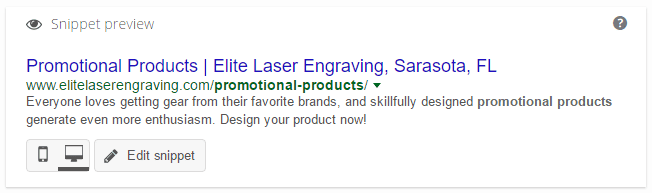
Strong SEO writing is an important part of this process. Additionally, there are some other back-end pieces that to take care of. It’s things like creating strong snippets (using Yoast SEO) that can make a big difference. Not only should a snippet contain your keywords, but it also needs a strong call-to-action.
In addition to this kind of metadata, we make sure other elements are properly addressed:
- Content readability – Yoast SEO does a great job scoring the page content for this. And I like to run all of my content through Hemingway App to help me find and correct difficult to read sentences, passive voice, and other readability factors.
- Link balance – Every page should have links to other internal (your site) pages, but also external links to other websites. Don’t overdo it, but make sure the page’s links are strong and add value.
- XML sitemap considerations – Static pages on the site that provide authority should be set to a high priority for the search engine bots. Additionally, less important pages (like your contact page, etc) should be bumped down in priority or removed from indexing altogether. This helps tell the search engines to determine what content is really important on the website.
Beyond this, if you have green lights from Yoast SEO on readability and SEO, then you should be all set.
The Results
Before this redesign work on the website, laser engraving was already performing well for us in local searches. Usually in the top three, and sometimes number one. The site was not ranking at all for the terms promotional products or personalized gifts. Once Google’s bots got to index the new site changes, we noticed some nice results. The homepage now seems to have a pretty strong hold on the #1 spot for laser engraving locally. And local searches for the other terms are now ranking the website in the top five!
Promotional products is currently ranking the homepage at #5…
Personalized gifts is performing even better with TWO pages ranking in the top five! Here you see that not only did the homepage rank for this term, but so did the authority page…
Other Considerations
These results were achieved without any other external SEO work. Simple, yet strong design strategy resulted in major improvements in search engine rankings.
At the same time, there are a few other tactics which could support (or even improve) strong results like this:
- Link building and other off-site SEO promotion – Building a good portfolio of links pointing back to all of these pages could continue to enhance their credibility.
- Content marketing strategy – Producing fresh and relevant content using related keyword terms can strengthen on-site authority.
- Social media marketing – Providing social proof for these pages by sharing them regularly on social media sends strong signals to the search engines.
- High-performing WordPress web hosting – Making sure that your website runs at peak performance is crucial to any SEO strategy.
There’s definitely a strategy to follow if you want to build a website for great search engine ranking. And the key really is to think through all of the elements of the design and don’t skip some for convenience. If you do a good job with all of this, you’ll see the payoff in increased visibility (and traffic).
by Dan King | Jan 4, 2017 | local seo strategy
Winning in local SEO isn’t about doing some magic trick and spiking yourself up to number one overnight. Remember the story about the tortoise and the hare? The idea is simple. Keep doing the right things consistently over time, and you’ll win. You can increase your organic (not paid ad) Google traffic over time by consistently focusing on a few key tactics. That’s what happened last year with one local business we work with. And I’ll be honest with you. I didn’t have much hope for them at times through this process. If you understand SEO, then you know there are internal and external factors that impact your rankings. Internal factors might include having a strong, user-friendly website design and authoritative content in your area of expertise. External factors deal with off-site issues like having a strong backlink strategy. In order to do really well, both of these areas need to be handled well.
What We Could Have Done Better
It was a year of transition for this local business. Over the course of the year, there were three different Marketing leads to work with. The transitions meant different ideas coming to the table regularly, and a need to move slowly on big changes. For us, that meant we weren’t able to pull the trigger on some bigger website changes we felt needed to get done. In particular, it would have helped our SEO chances greatly if we were able to:
- Update the look and feel of the site to a more modern design
- Restructure and streamline the site for user experience and a strong sitemap
- Bulk up thin content pages to show greater authority
The good news is that it looks like we may be giving these things more attention this year. With this stuff not running optimally, we saw improvements in Google traffic, but not as much as we could have.
The Improvement We Saw In Google Traffic
In 2015, organic search produced 4,333 first-time visitors to the website. In 2016, that number was 6,446 first-time visitors. That’s an increase of over 2,100 more people (48.77%) coming through their (virtual) doors! This chart might not look overwhelming, but remember the tortoise and the hare? Each month this year (blue bar) represents an increase anywhere from 110 to 280 more new visitors per month than the previous year (orange bar). It represents steady, consistent work resulting in steady, consistent results.
What We Did To Get These Results
Early in the year, we did some initial cleanup and link building, which gave us a bit of a boost out of the gate. Internally, there was some cleaning up of meta descriptions (the snippets you see in search results), and other optimization. Externally, we did multiple tiers of link building and social bookmarking. That all gave us a good start, but the real story is in the consistency throughout the year. Here’s what we did, and all within a budget of less than $400/mo:
- Backlink Cleanup – Before we got into building our (good) backlink portfolio, we first needed to get rid of any old backlinks that were hurting us. We were able to uncover several links that held us down and get rid of them (as far as Google is concerned).
- Creating Social Signals – We have a way to sort of mimic the effect that celebrity social media accounts can have when they share something. These social signals usually have a quick impact by showing the search engines that something on your site is of high social value.
- Contextual Links with Guest Posting – The idea here is to get authoritative websites to write an article about a subject related to you and include a link in the article back to your website. The higher authority of the website, the higher value of the link back to you.
- Advanced Crowdsearch – This is a strategic way of creating some of the other signals search engines look at to determine the value of your site (and its content). When search engines see the value, they bump you up in the rankings.
After the backlink cleanup, we just put the other three items on a three-month rotation. Each month we would do just one of them, and target it at the homepage of the website. After we worked through all three of them over a three-month period, we would start over.
Consistency is the Key
It’s also important to note that if the budget allowed for us to do two or three of these things every month, the results we saw would be greatly magnified. You get out of it what you put into it. But more importantly, the key is in the consistency.
Doing the right things regularly paid off by generating more Google traffic to the website. And if we’re doing our job well on the website, then we’ll be converting those visits into sales leads and then into customers. More on that idea some other time… https://twitter.com/FistbumpMedia/status/816826951105216514
by Dan King | Oct 26, 2016 | business strategy
Good website design and management is not based on feelings or personal preferences. Rather it’s based on data and facts that move you closer to your goals. That’s why I love A/B split testing. It’s all about figuring out the correct path for your design based on hard data.
If you’re serious about measuring the ROI of a website, then A/B split testing will help you work towards the best design by allowing you to test different options against each other to discover which is the higher performing design. You start by picking a key conversion metric (like a buy button, a sign-up button, or some other call-to-action or metric), and designing two (or more) versions of the page. Visitors to the page can be randomly served one page or the other, and the tracking tools will measure how often your desired conversion happens on each page. Once you determine a winner, then you can direct all traffic to the final, higher-performing page.
You should also consider incremental design using A/B split testing. Once your initial experiment is complete, you can try again with the same page by changing another element, allowing you to continue improving the page’s performance over time.
There are many tools available to help you with A/B split testing. But everything you need to run a split test experiment is available for free in Google Analytics. Here’s what you need to do to set up your own experiments:
Step 1: Decide What You Want to Measure
The first thing you’ll need to do is to determine what you want to measure. Is it a site metric like pages per visit, or length of time on site? Or is it getting to a specific page like a sign-up form, or a purchase “thank you” page?
As you define your desired outcomes, you’ll need to create multiple versions of the web pages you plan to test hoping to achieve that outcome. Each of these two (or more) pages will have something different in their design. While you can test two pages with completely different designs, it’s best to test smaller elements of similarly designed pages. Test things like placement of the call-to-action on the page, or the colors of sign-up forms, or the wording used in the header text on the page, or whatever other option you want to test. Whatever it is, create the pages with your desired outcome in mind and how you think you can improve conversion rates with your page variation(s).
Once you have your split test pages created, you’ll be able to set up the goals you’ll need to measure their success.
Step 2: Create Goals in Google Analytics
Once you know what it is you want to measure, then you’ll need to set up the Goals so that Google Analytics can track the conversion rate on those events. Goals are good to track regardless, but you’ll need specific goals to use for your split test experiment. Here’s how you set those up in GA:
 Go to the Admin tab in Google Analytics
- Select the profile you want to add your goal to
- Click on the ‘Goals’ tab
- Click the ‘+ New Goal’ button
- Select the option for either an existing template or a custom setup (most likely a template)
- Complete the Goal Description by giving it a name and selecting the type
- Complete the Goal Details with the desired outcome/values for your goal type
- Click ‘Save’
Once your goals are set up, then you’ll be able to create your split test experiment.
Step 3: Create Your Split Test Experiment in Google Analytics
At this point, you should have two (or more) versions of a web page you’ll be testing, and at least one goal you’ll be using to track and compare the pages. With that you’ll be able to set up your split test experiment in Google Analytics.
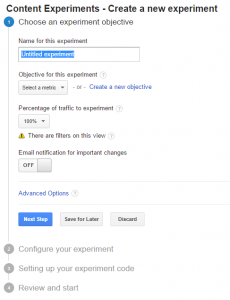 Go to the Reporting tab in Google analytics
- Select ‘Experiments’ in the ‘Bahvior’ menu
- Click the ‘Create experiment’ button
- Set name and objective for the experiment
- Configure your experiment with the original page and variations
- Insert your experiment code immediately after the head tag for the original page in your test (Google Content Experiments plugin)
- Review and start your experiment
Your experiment will run for a period of time (Google defaults it to 30 days) tracking the goal conversion as it sends visitors randomly to the original page and each variation. After your experiment has run for a sufficient amount of time, you’ll be able to determine a winner.
Step 4: Determine the Winner and Repeat as Needed
Once you determine a winner, then you can direct all traffic to the winning page. Now you can be confident that you’ll be getting the better conversion rate for your goals. At this point you can leave it alone, or try another change on the page. The beauty of incremental design using A/B split testing is that you can constantly be working towards better conversions. The result will never take you backward. If you try another split test, and your new “B” page does not perform better than your “A”, then you keep the existing “A” page. And when a new “B” page out-performs your “A” page, then it takes over as your new “A” page for the next test.
I recently worked with a client on a split test for the highest traffic page on their website (it gets more traffic than the homepage). The problem with the page was that it also had a high bounce rate. So we knew it was effective in getting people TO the website, but not with KEEPING them there. We reviewed the page and rebuilt it with a cleaner design and a nice call-to-action at the top of the page to encourage click-through to another page for more information (lowering that bounce rate). With the newer, much fancier design, we were certain the new variation would be a big hit with visitors.
Much to our surprise, the split test experiment showed that the original not only out-performed our awesome new design, but it beat it pretty decisively. That was a great reminder for me that I should never base design on feelings or personal preferences. Data shows the real impacts.
Use the data available to you effectively, and you’ll reap the rewards of a high-performing website.
Note: This post was originally published on the MainWP Blog.







 This chart might not look overwhelming, but remember the tortoise and the hare? Each month this year (blue bar) represents an increase anywhere from 110 to 280 more new visitors per month than the previous year (orange bar). It represents steady, consistent work resulting in steady, consistent results.
 Good website design and management is not based on feelings or personal preferences. Rather it’s based on data and facts that move you closer to your goals. That’s why I love