

If you’ve been following WordPress news lately, you’ve probably seen the buzz about WordPress 7.0 and its new AI features. And if you’ve already updated and you’re sitting there wondering “okay, but… what does this actually do?” — you’re not alone. That’s the most common reaction I’ve seen, and honestly, it’s fair.
Here’s the honest take: what’s in WordPress 7 right now is a foundation, not a finished product. But it’s an important foundation, and understanding what’s been built — and what’s coming — is worth a few minutes of your time.
Let me walk you through it.
What WordPress 7 Actually Ships With
The big change in WordPress 7 isn’t a shiny new AI button that writes your content for you. It’s infrastructure — specifically, a provider-agnostic AI framework that gives WordPress a standardized way to interact with AI models from different companies.
In plain language: WordPress can now talk to AI. And it’s built to work with any major AI provider, not just one.
The three default connectors built into WordPress 7 are OpenAI (ChatGPT), Anthropic (Claude), and Google (Gemini) — the three biggest players in the space. You’ll find them under Settings > Connectors in your WordPress dashboard.
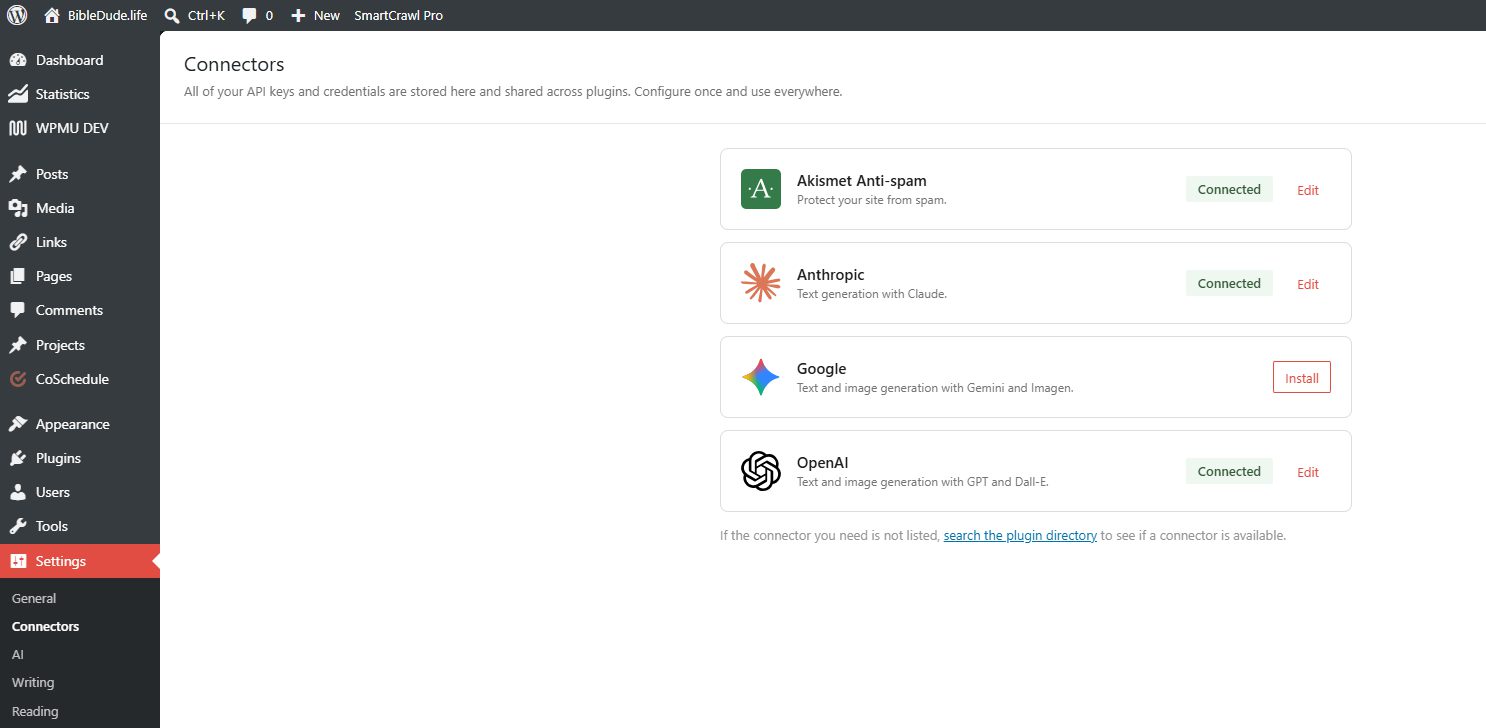
You no longer need separate plugins for each AI provider. Enter your API key once in the Connectors screen and all compatible plugins can use that connection automatically. That’s genuinely useful once the plugin ecosystem catches up to it — which is already starting to happen.
One important note for anyone with privacy concerns: WordPress does not send prompts or data to any AI service by default without your explicit consent and configuration. Nothing is happening behind the scenes until you set it up.
Setting Up the AI Engine Plugin
Getting the connectors set up is step one. Step two is activating the AI Engine plugin, which is what actually gives you useful functionality to work with right now.
When AI Engine is active, the Connectors page shows a banner letting you enable AI Engine to manage your connectors. One click and every AI call on the site — whether it comes from core, a theme, or another plugin — runs through AI Engine.
What does that give you? Every call gets logged with the model used, tokens consumed, and cost. You also get defaults per feature type, rate limiting, and support for additional providers beyond the default three.
The out-of-the-box WordPress AI experience is pretty bare-bones. There’s no streaming, no logging, no cost tracking, and no rate limits in the default setup. AI Engine fills those gaps and gives you a production-ready layer underneath the new framework.
So: install AI Engine, activate it, connect your preferred AI model (Claude, ChatGPT, or Gemini — your call), and turn on the features you want to start using. That’s the setup.
Okay But What Does It Actually Do Right Now?
This is the question everyone’s asking, and I want to be straight with you: the current functionality is modest. You’ll see things like content suggestions in the editor, some writing assistance features, and the experimental tools that Automattic has packaged alongside the release.
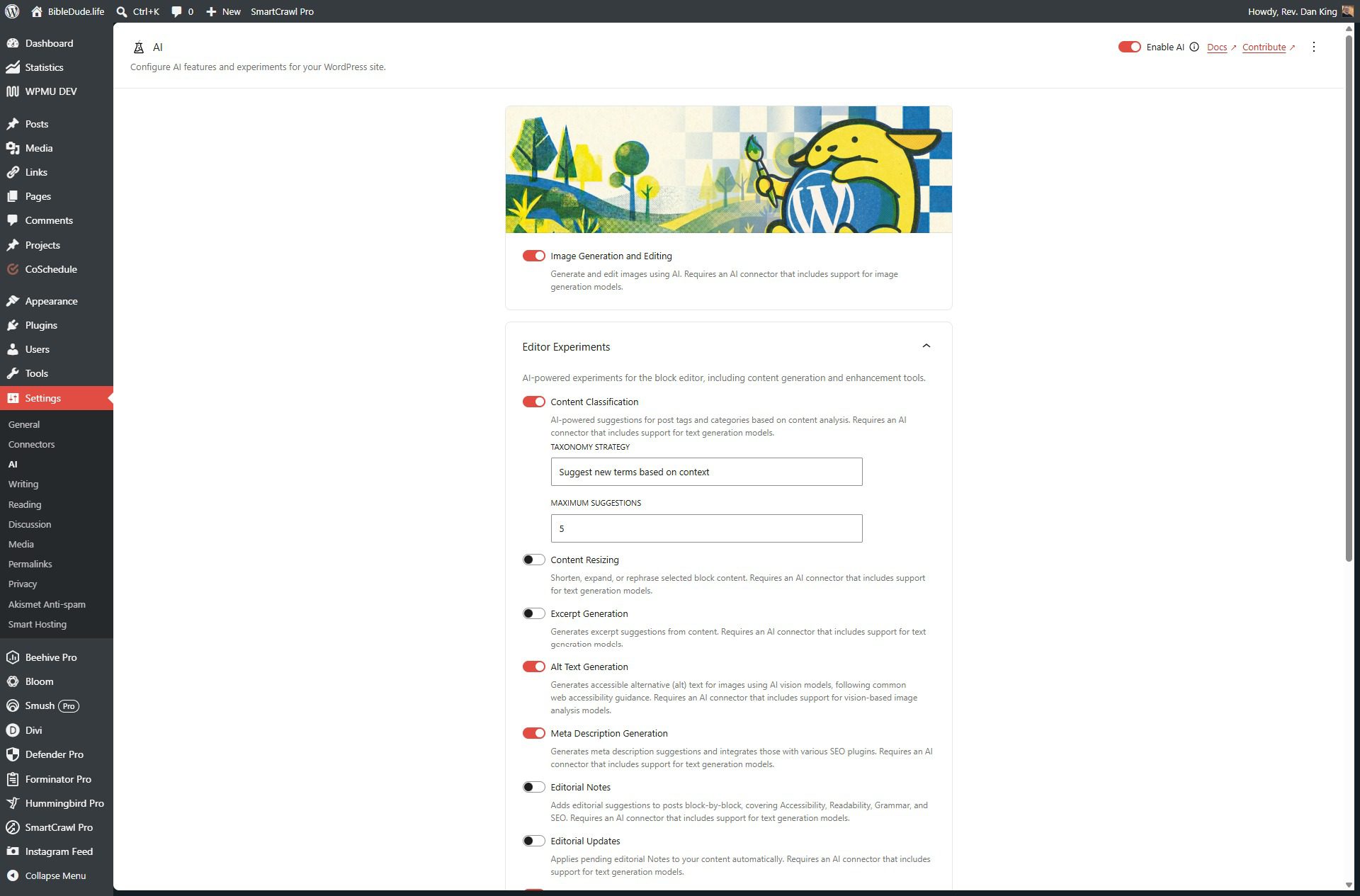
If you turn it on expecting to be blown away, you probably won’t be — yet.
WordPress 7.0 adds AI infrastructure, not a built-in chatbot. What it’s really done is lay the groundwork so that plugins, themes, and third-party tools can now connect to AI in a consistent, standardized way across your whole site — instead of every plugin doing its own thing with its own API key management.
That’s the shift that matters. The platform is now built to support AI-powered tools at a deeper level than ever before. And that changes what’s possible going forward.
Why This Matters for Our Clients Specifically
Here’s where I want to be a little more direct with you if you’re one of our hosting clients.
We’ve been working on Smart Hosting features that are almost ready to roll out — tools designed to give you better insight into your site’s performance, traffic, and health directly from your dashboard. The AI infrastructure that just landed in WordPress 7 opens up direct integration paths for exactly the kind of tools we’re building.
I’m not going to overpromise on timing or specifics right now. But I will say: this release wasn’t just interesting news for us. It was a green light.
The foundation is in place on your end. When our tools are ready to connect, your site will be ready to receive them.
What to Do Right Now
If you want to get set up and start exploring:
- Update to WordPress 7 if you haven’t already
- Go to Settings > Connectors and install the connector for your preferred AI provider (Claude, ChatGPT, or Gemini — all three are solid choices)
- Install and activate the AI Engine plugin
- Enable AI Engine to manage your connectors
- Activate the features you want to start using and explore what’s there
Don’t stress about choosing the “right” AI model. All three connectors work well, and you can switch providers at any time from the Connectors screen without breaking anything. If you’re already using Claude for other things, it’s a natural fit here too.
And if you’re on one of my hosting plans and want a hand setting this up, just reach out. We’ll get you sorted.




0 Comments