


This site was already scoring a B on GTmetrix. Performance at 78%. By most standards, that’s a solid, healthy website. Nothing alarming.
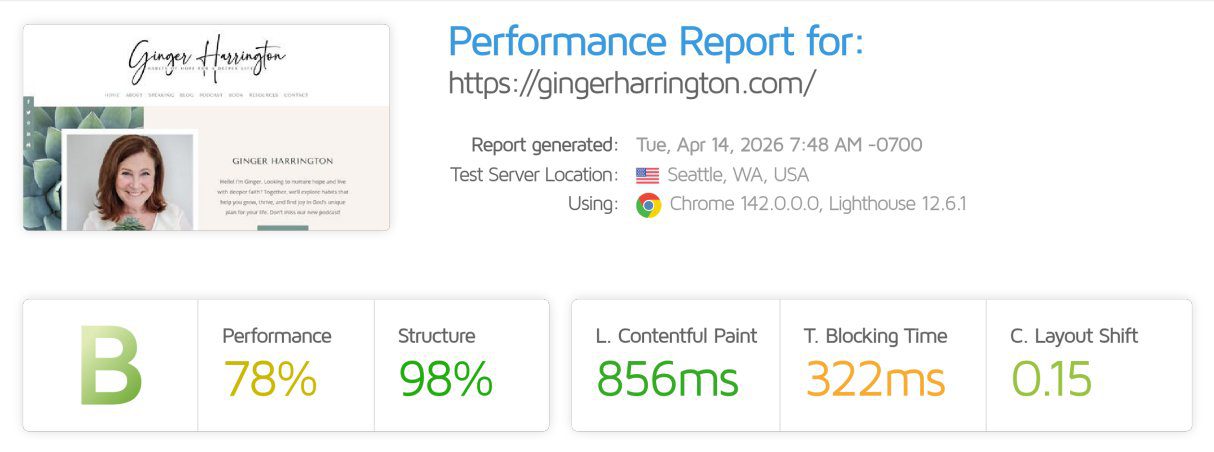
Then we changed one thing. We didn’t touch the theme. We didn’t clean up plugins. We didn’t optimize a single image or rewrite a line of code. We changed where the site lived, moving it from a shared hosting plan to a dedicated environment.
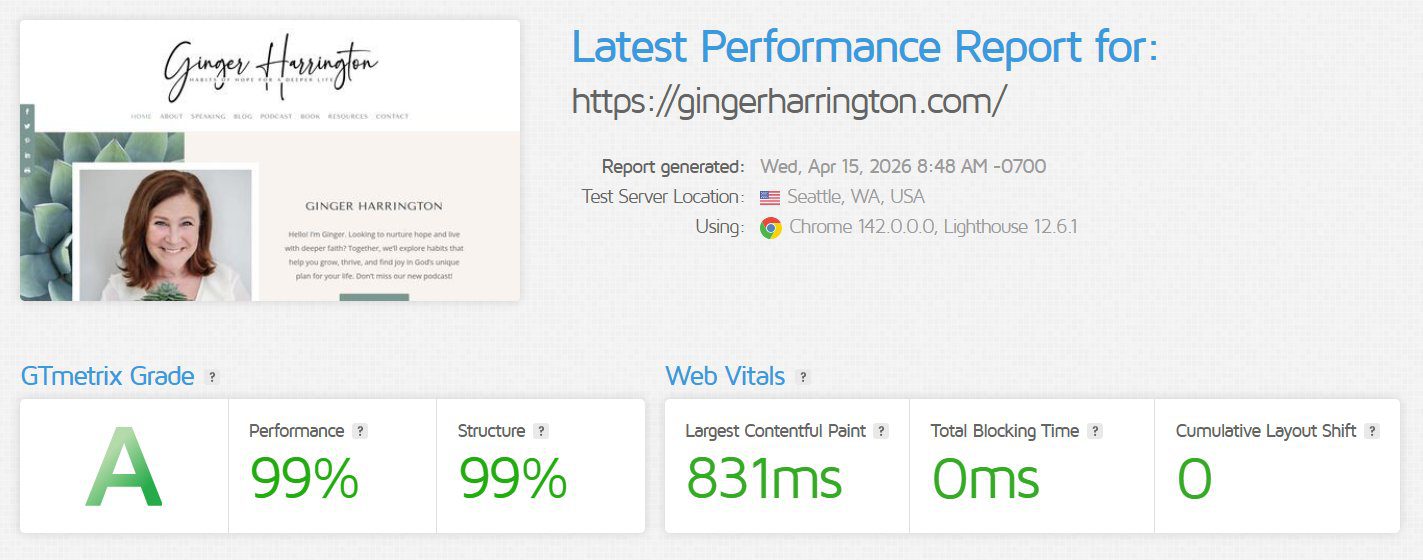
The result: the grade jumped to a 99% A, and the server response time dropped by roughly 10x.
Same site. One change. That’s the whole story, and it’s worth understanding, because it points to something most people get wrong about website speed.
The site we’re talking about
The site belongs to Ginger Harrington, an author and speaker. It’s a genuinely well-built WordPress site. Clean design, good structure, nothing sloppy under the hood. This was not a rescue mission. This was a good site that was already performing reasonably well.
That’s exactly why this example is useful. It’s easy to make a broken site faster. You fix the obvious problems and the numbers climb. What’s harder to explain, and more revealing, is what happens when you take a site that’s already doing well and change nothing but the ground it stands on.
Before the move, Ginger’s site was on our BASIC+ plan. I want to be clear about something here, because it matters. BASIC+ is a strong plan. It’s managed WordPress hosting, and it runs circles around the cheap shared hosting most people land on at the big-box hosts like GoDaddy or Bluehost. The difference is in how it’s managed: proper caching, security, updates, and a server that’s actually looked after. A well-managed shared plan is a real, legitimate home for a lot of websites.
But shared hosting, even good shared hosting, has one quality built into it that no amount of management can fully remove. We’ll get to that. First, look at what the numbers actually showed.
The “before” that looked fine (but wasn’t telling the whole story)
Here’s where it gets interesting. The GTmetrix grade said B, 78% performance. If you stopped there, you’d shrug and move on.
But a single speed test is one snapshot, taken at one moment, under whatever conditions happened to exist right then. It’s like checking traffic once and deciding that’s what your whole commute is like. The real picture comes from watching the site over time, under real conditions, with real traffic hitting it.
So we did. We monitored the server response time, the amount of time the server takes just to start responding to a request, before a single pixel of the page even begins to load. Over that window, here’s what we saw on the shared environment:
- Average response time: about 1,287 milliseconds. Nearly a second and a half just to begin responding.
- Peak response time: 2,771 milliseconds. Almost three full seconds on the worst spikes.
- And the pattern was volatile. The response time jumped around constantly, spiking up and settling down and spiking again.
That volatility is the part the B grade never showed. Your visitors don’t experience your average. They experience whatever they get in the moment they arrive. And if that moment lands on a spike, they’re staring at a blank screen for nearly three seconds, which in web terms is an eternity. Plenty of them leave before the page ever finishes.
So the “before” wasn’t bad, exactly. It was inconsistent. And inconsistent is its own kind of slow.
What we changed: nothing but the environment
This is the important part, so I want to state it plainly.
We moved the site to a dedicated hosting environment. That’s it. That’s the entire change.
- Same theme.
- Same plugins.
- Same content.
- Same images.
- Same code.
- No other optimization work of any kind.
If anything else had changed, this wouldn’t be worth writing about, because you couldn’t tell what caused what. The reason this example is useful is that it’s a clean test. One variable. Everything else held exactly the same.
The “after”: the part that makes people do a double-take
After the move to the dedicated environment, we ran the same tests.
The GTmetrix grade went from a 78% B to a 99% A. Performance and structure both at 99%. Total Blocking Time dropped to zero. The layout-shift score cleaned up to zero as well.
But the grade isn’t the headline. This is:
That server response time, the one averaging around 1,287ms with spikes near 2,771ms, dropped to a flat line hovering around 150 milliseconds. And it stayed there. The volatility disappeared. No more spikes. Just a consistent, fast response, request after request.
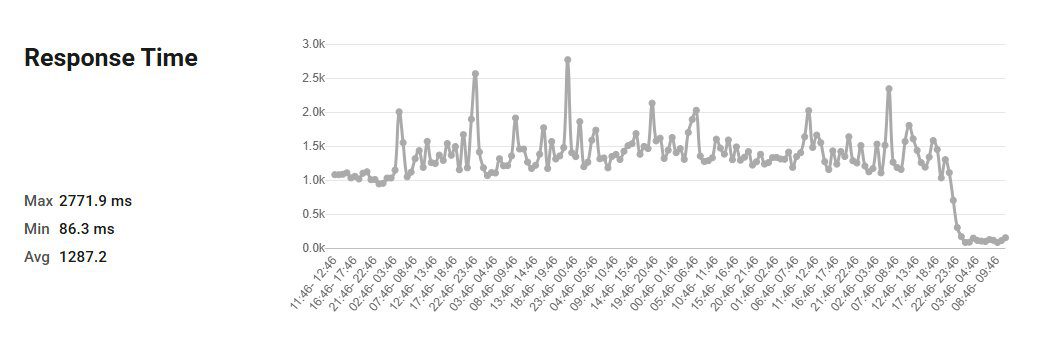
From roughly 1,287ms to roughly 150ms. That’s about a 10x improvement in how fast the server starts responding.
And remember, we didn’t optimize anything on the site to get there. The site was capable of this speed the whole time. It was being held back by the environment it was sitting in.
So why does a dedicated environment do this?
Here’s the actual explanation, because understanding it will change how you think about your own site.
On shared hosting, your website lives on a server alongside other websites. You’re all drawing from the same pool of resources, the same CPU, the same memory. Most of the time that’s fine. But when one of the other sites on that server gets busy, or runs something demanding, everyone else feels it. Your site’s response time slows down, not because of anything you did, but because of what’s happening around you.
This is often called the “noisy neighbor” problem, and it’s the source of that volatility we saw in Ginger’s before-numbers. Those spikes to nearly three seconds weren’t her site’s fault. They were the server getting crowded.
And here’s the key point, the one that reframes this whole conversation: no amount of on-site optimization fixes this. You can compress every image, minify every script, install the best caching plugin on the market, and you still can’t do anything about a backend that’s competing for resources with a dozen other sites. The ceiling isn’t in your site. It’s in the environment.
A dedicated environment removes the competition. The resources are yours. Nobody else’s traffic touches your response time. That’s why the numbers didn’t just get faster, they got consistent. Fast and steady, instead of fast-sometimes and slow-other-times.
That’s the quality shared hosting can’t fully escape, even when it’s managed well. Good management makes shared hosting strong. It can’t make it dedicated.
Who actually needs this?
I’m not going to tell you every website needs to move to a dedicated environment, because that’s not true.
If you’re running a brand-new blog with a handful of visitors a month, a well-managed shared plan is genuinely the right call. You’d be paying for headroom you don’t need yet.
This matters when your site is doing real work. When you’re getting meaningful traffic and you can feel the lag. When you’ve already optimized everything you can on the site itself and something still feels slow. When you’re running a business on your site and consistency isn’t a nice-to-have, it’s the difference between a visitor staying and a visitor leaving. When those slow spikes are quietly costing you readers, subscribers, or sales you never even know you lost.
If that’s you, the environment your site lives in is probably the single biggest lever you have left. And it’s one most people never think to pull, because they assume all hosting is basically the same. It isn’t.
Where to go from here
If you read all of this and thought about your own site, that’s the right instinct. You might be doing everything right and still be capped by where your site lives.
Our PERFORMANCE and PERFORMANCE+ managed hosting plans are the dedicated environments built to do exactly what you saw here: fast, consistent server response, with your resources reserved for your site and nobody else’s.
If you want to talk it through before deciding, that’s easy to do. You can:
- Start a chat right here on the site and ask me anything.
- Reach out through the contact page, where you can also schedule a time to talk it through with me directly if you’d rather have a real conversation about your situation.
- Or if you already know this is the move, you can get started on a plan at fistbumpmedia.com/wordpress-support-plans.
Here’s the one idea I want to leave you with. Hosting isn’t a commodity you pick by finding the lowest monthly price. It’s the foundation everything else on your site sits on top of. You can build something beautiful and optimize it to the last detail, and still leave real speed, and real results, on the table simply because of where it’s hosted.
Ginger’s site was already good. Changing where it lived made it fast. That option is sitting there for most sites, waiting.




0 Comments