


You ran your website through our free grader. You got a number. Maybe it was 72. Maybe it was 45. Maybe you got a perfect 100 on SEO and a 12 on Performance and now you’re not sure what any of it means for your actual business.
That’s what this post is for.
I ran my own personal blog through the grader so I could show you exactly what the results look like and what to do with them. Let’s walk through it.

The overall score gives you a quick snapshot, but the category scores are where the real information is.
Your Overall Score
The overall score is out of 100 and is calculated from four categories: Performance (30 points), SEO (30 points), Mobile (30 points), and Security (10 points). A score of 75 means you’re doing some things well and some things need attention.
Here’s the thing most people miss: the overall score is almost meaningless on its own. What matters is which category is pulling it down. A 75 with a 28 on Performance is a very different problem than a 75 with a 28 on Mobile. Each one has different causes and different solutions.
Find your lowest category score. That’s where to start.
Performance: /30
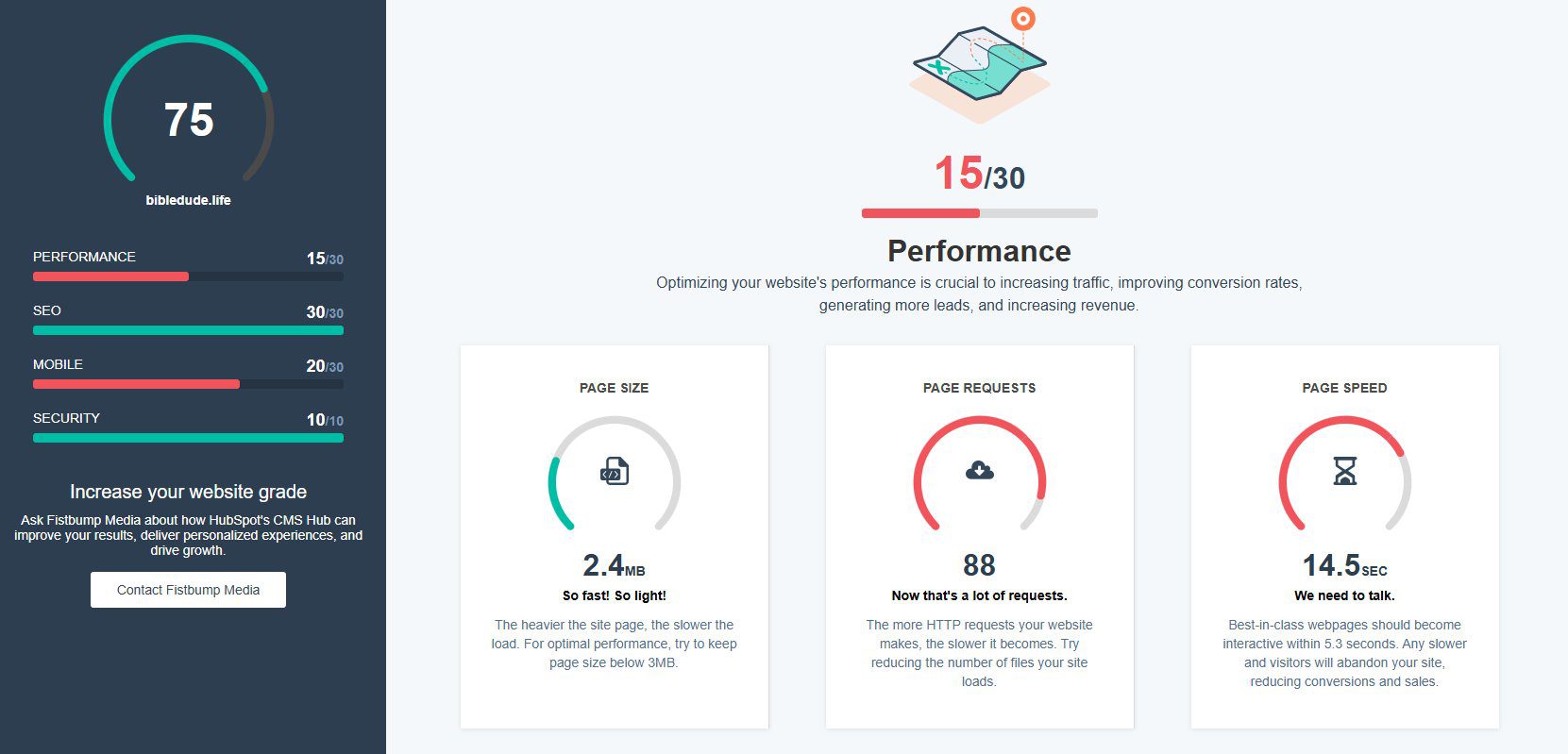
Performance measures how fast your site loads and how efficiently it delivers content to visitors. The grader checks three things: page size, page requests, and page speed.
Page size is how much data your site forces the visitor’s browser to download before anything shows up. Under 3MB is the target.
Page requests is the number of separate files your site has to load — images, scripts, stylesheets, fonts. The more requests, the longer everything takes. Under 30 is the goal. My personal blog had 88, which is why it scored 15/30.
Page speed is the one most people care about. Best-in-class sites load in under 5.3 seconds. Mine came in at 14.5 seconds — “we need to talk” as the grader puts it.
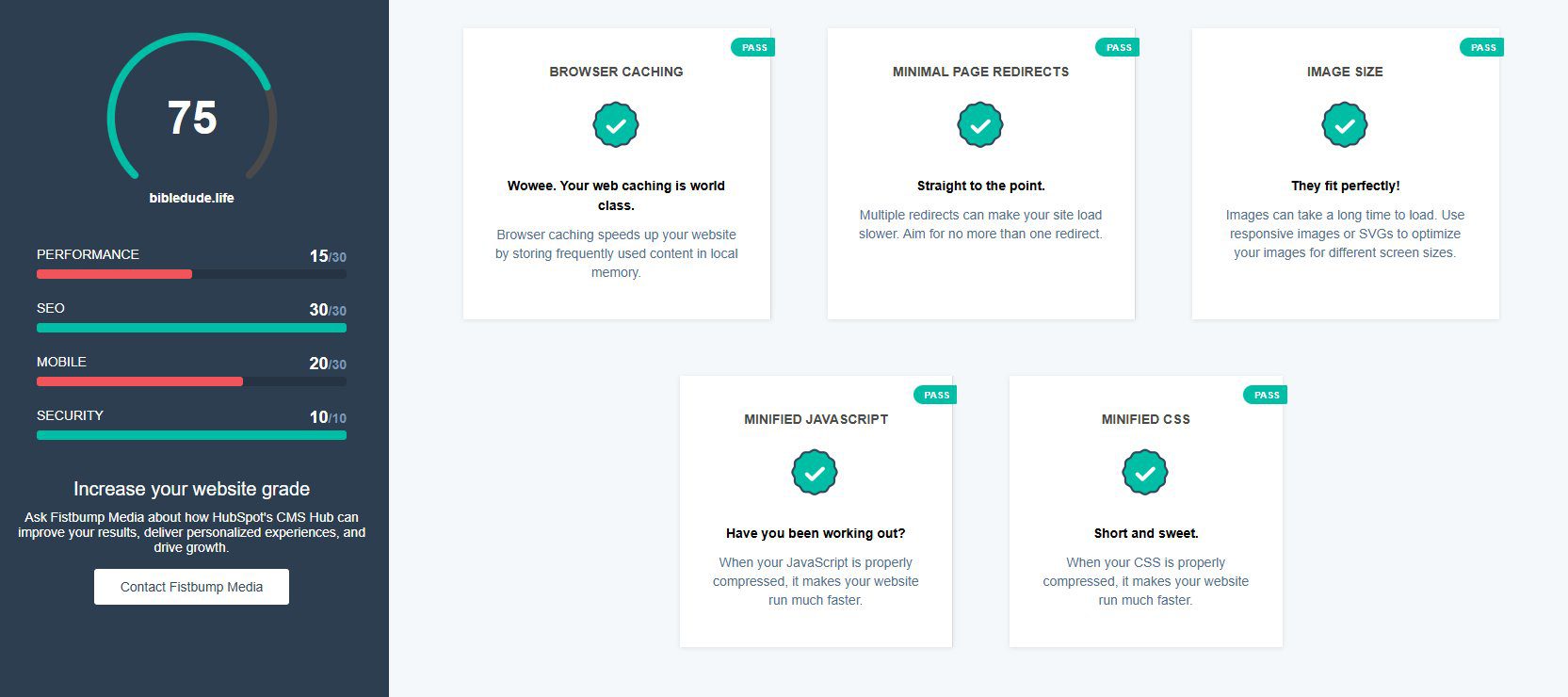
Why does this matter? Because slow sites lose visitors before they even have a chance to read a word. Google also uses page speed as a ranking factor, so a slow site doesn’t just frustrate visitors — it actively hurts your search visibility.
If your Performance score is low: This is usually fixable without rebuilding your whole site. Image compression, caching configuration, and plugin cleanup can make a significant difference. Our speed optimization service addresses exactly this, typically within 48 hours.
SEO: /30

The SEO score checks four technical fundamentals: whether search engines have permission to index your site, whether you have meta descriptions set up, whether you’re using content plugins correctly, and whether your link text is descriptive.
This is the basic hygiene layer of SEO — not keyword strategy or content planning, just whether your site is set up in a way that lets Google understand and index it properly. My blog scored 30/30 here, which means these technical basics are in order.
Getting a perfect SEO score doesn’t mean your site ranks well for anything. It means the technical foundation is solid. You still need a content strategy to actually rank for the terms your audience is searching.
If your SEO score is low: Start with the technical fixes the grader identifies. Then, if you want to build real search traffic, this course walks through a complete SEO strategy for blogs and content sites.
Mobile: /30
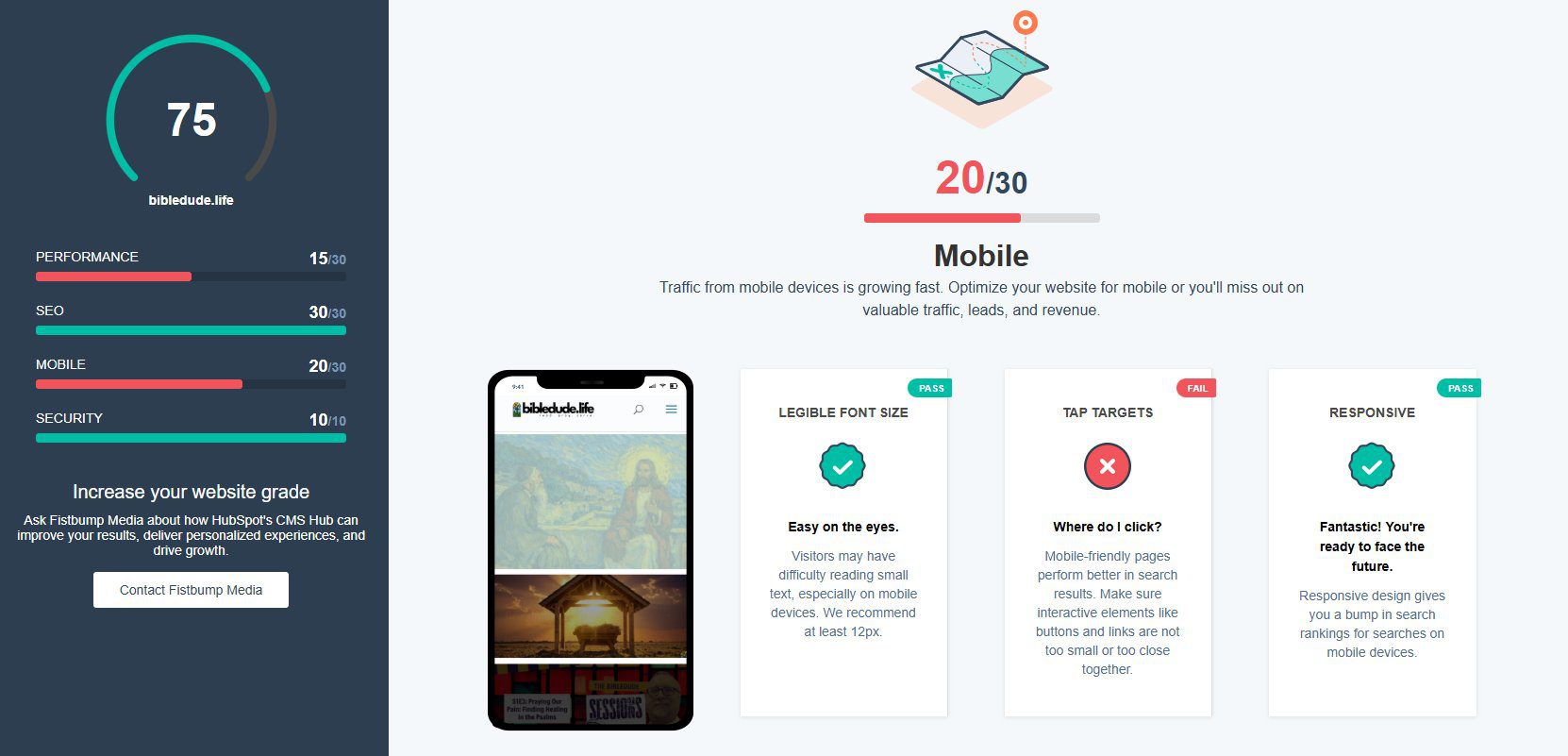
The mobile score checks three things: whether your fonts are legible on small screens (at least 12px), whether your tap targets — buttons and links — are large enough to click with a finger, and whether your site uses responsive design that adapts to different screen sizes.
More than half of all web traffic now comes from mobile devices. If your site gives mobile visitors a poor experience, they leave — and Google notices. My blog scored 20/30 because of tap target issues, meaning some buttons and links are too small or too close together for comfortable mobile use.
Responsive design (which my site does have) is the foundation. But passing that test doesn’t mean the mobile experience is good — just that the layout adjusts. The details of font size and tap target spacing matter too.
If your Mobile score is low: This is often a theme or CSS issue that requires hands-on fixes. Our WordPress maintenance plans include mobile optimization as part of ongoing site care, so issues like this get caught and fixed rather than sitting unaddressed.
Security: /10
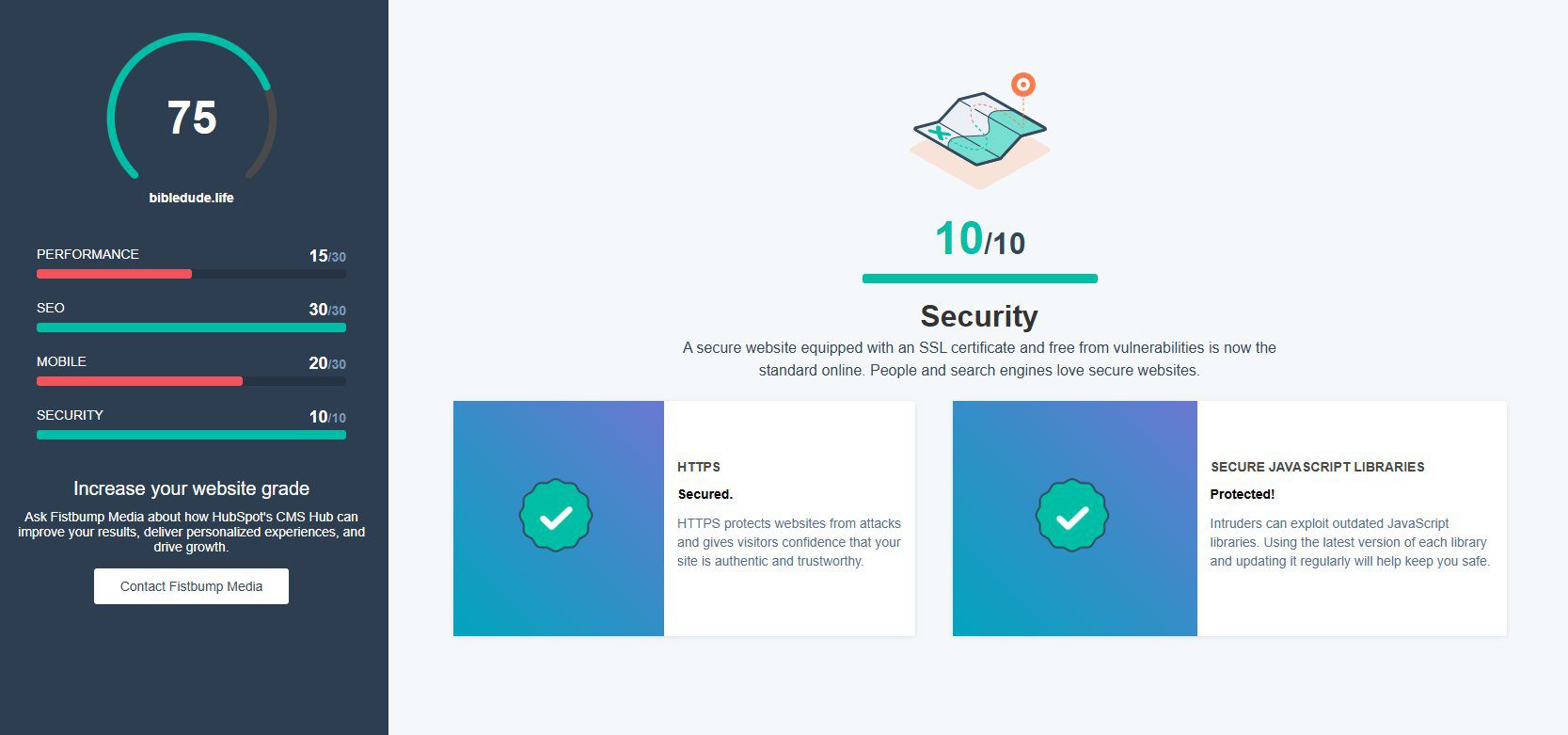
Security is worth 10 of your 100 points and checks two things: whether your site is running on HTTPS (the padlock in the browser bar), and whether your JavaScript libraries are up to date. Outdated JavaScript libraries are a common entry point for malware.
My blog scored 10/10 here — HTTPS is active and the JavaScript libraries are current. This is the easiest category to get right if you’re on managed hosting, since SSL is typically included and plugin/library updates are handled as part of maintenance.
If your Security score is low: Don’t sit on this one. A vulnerable site can be taken down or compromised faster than you’d expect. Our security and malware service gets you protected quickly, and our hosting plans keep you protected on an ongoing basis.
“What Should I Do Next?”
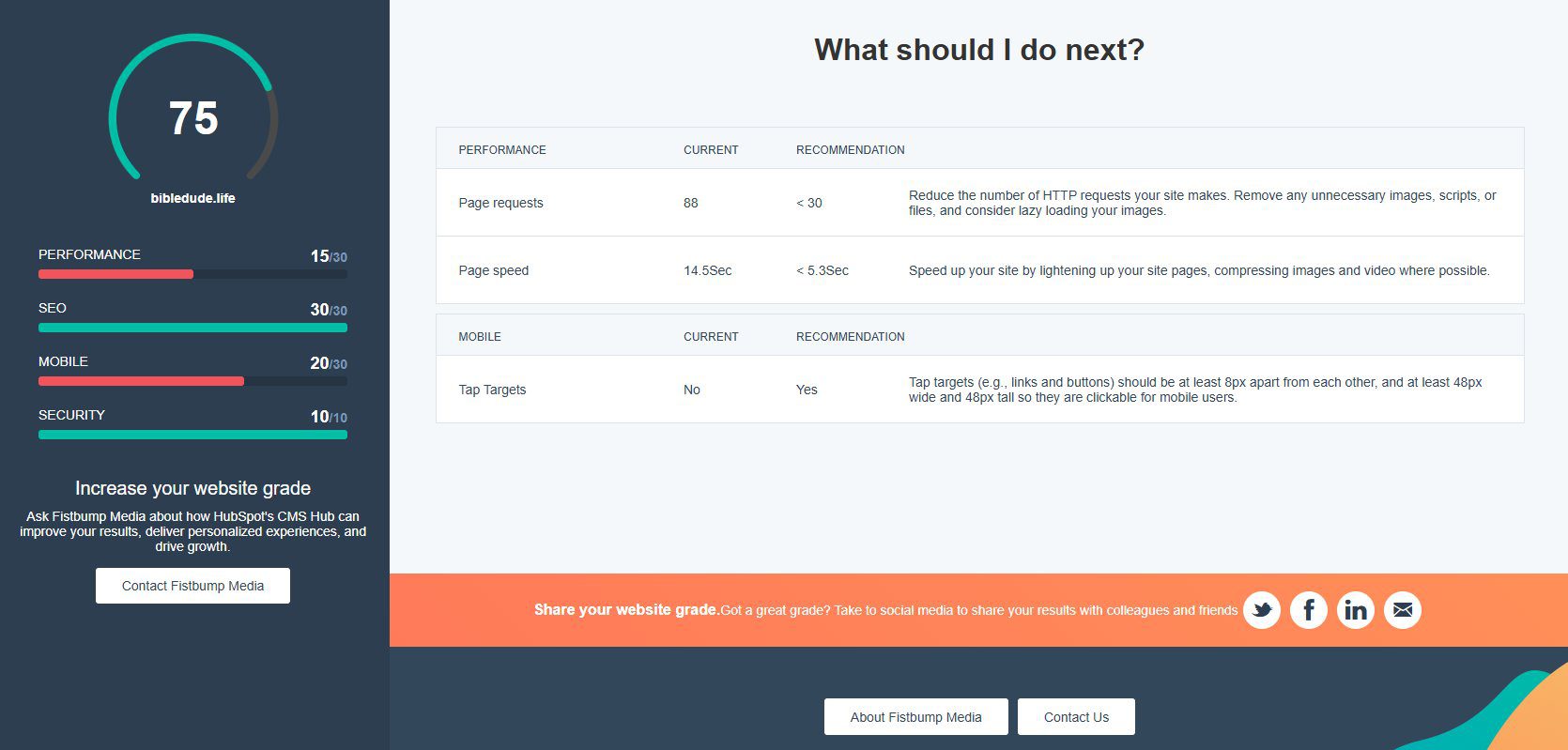
At the bottom of your grader results, you’ll find a “What Should I Do Next?” section that shows your specific failing metrics alongside the targets and recommendations for each one. This is your action list.
Work through it in priority order: Security first if it’s low (don’t wait on this), Performance next if your load time is significantly above 5.3 seconds, then Mobile, then any SEO gaps.
If you’re not sure which issues to tackle yourself versus hand off to someone else, that’s an easy conversation. Most of the technical issues the grader identifies are things we handle for clients regularly — and knowing what’s wrong is half the battle.
Haven’t Graded Your Site Yet?
If you landed on this post without having run your site through the grader yet, do that first. It takes about 30 seconds and gives you a personalized breakdown of exactly where your site stands right now.
Once you have your score, come back to this post and find the section that matches your lowest category. That’s your starting point.
And if you want a second set of eyes on your results, just reply to the email you received after grading — I read every one.





0 Comments